 Firefox
 1 / 8
1 / 8Loading font…
About Vintage Doodle Font
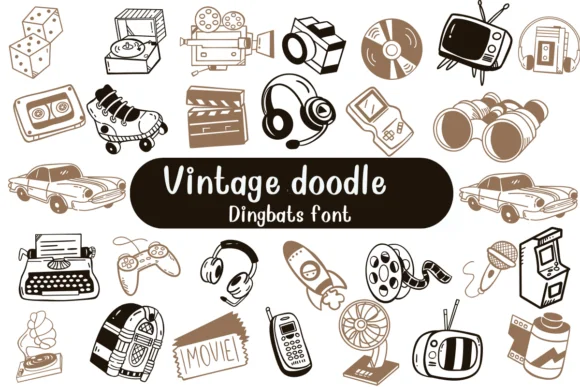
Vintage Doodle by Nongyao is a dingbat collection of hand-drawn illustrations that captures mid-century nostalgia through whimsical, loose line work. The set features vintage cameras, record players, typewriters, vinyl records, musical notes, and decorative flourishes, each rendered with the organic imperfections of genuine doodles. Rather than appearing as polished icons, these marks feel sketched by hand and carry real character into retro design work.
Available in both OTF and TTF formats, the font integrates smoothly into Procreate, Affinity Designer, and Affinity Photo for designers working across multiple platforms. These illustrations shine in vinyl record store branding, vintage music merchandise and concert posters, podcast cover artwork with retro energy, and DIY bookplate collections. The hand-drawn quality works beautifully for tattoo flash sheets and custom sticker designs, where that vintage doodle aesthetic carries weight and authenticity. Each element has the slight irregularity that reads as period-correct rather than retrofitted nostalgia. Small-business owners and independent designers especially appreciate how these marks feel organic and handmade. Combined with type or used as standalone marks, they bring the unmistakable charm of mid-century character to modern projects.
Bring Vintage Doodle into your next creative project through Creative Fabrica and discover the authentic warmth of analog-era design.
Style & Use Cases
- Overall Style
- Iconographic, Fonts
- Use Case
- Icons, Accents
- Ideal For
- ornaments, bullets, and decorative flourishes
- Pairs With
- any text font
How to Install Vintage Doodle Font
Step-by-step instructions for every platform
- 1Download the Vintage Doodle font file (.ttf or .otf).
- 2Locate the downloaded file in your Downloads folder.
- 3Right-click the font file.
- 4Select "Install" to install for the current user, or "Install for all users" to make it available system-wide.
- 5Vintage Doodle is now available in Word, Photoshop, Illustrator, and all other apps.




Browse fonts by theme
Curated collections →Saw a font in a picture? Identify any font from an image with our free Font Finder.
More Dingbats Fonts
Browse all →







What pairs well with Vintage Doodle Font?
Vintage Doodle Font is a versatile dingbats font that works for both headings and body text. Pair it with a contrasting sans-serif or serif font to add visual interest and a clear distinction between titles and body copy.




Vintage Doodle Font
by Nongyao
Reviewed by the FontBoxDL team · Updated October 2026