 Firefox
 1 / 5
1 / 5About VINTAGE COMICS JNL Font
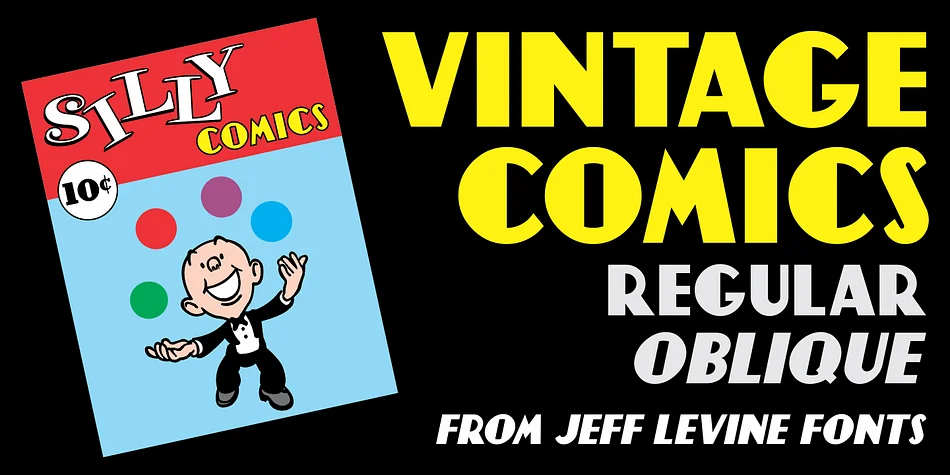
Playful nostalgia meets graphic punch with this bouncy, expressive font. VINTAGE COMICS JNL comes from Jeff Levine Fonts and captures the hand-drawn energy of 1940s comic book lettering without ever tipping into cartoonish excess.
This decorative typeface shines when your project needs bold personality and visual impact that reads clearly at any size. Vintage pulp fiction book covers, retro band merchandise, comic-style event posters, and DIY vintage game packaging are natural homes for this font. The letterforms have genuine movement and weight, commanding attention without requiring heavy effects or styling tricks. Both the regular and oblique versions expand your options for emphasis and composition, letting you shift mood without hunting for a different typeface entirely.
The real strength of VINTAGE COMICS JNL is knowing what it does best. It dominates in headline and display applications where personality matters more than subtlety. Pair it with something understated for maximum effect. A clean, neutral sans-serif like Futura or Gill Sans handles body copy and supporting text beautifully, which keeps the visual hierarchy clear and prevents the design from becoming too busy. The contrast between this expressive display face and a straightforward sans works every time. Get both versions on Creative Fabrica and let the retro energy flow.
Style & Use Cases
- Overall Style
- Bold, Distinctive
- Use Case
- Headlines, Posters
- Ideal For
- logos, packaging, and standout titles
- Pairs With
- a neutral sans-serif
How to Install VINTAGE COMICS JNL Font
Step-by-step instructions for every platform
- 1Download the VINTAGE COMICS JNL font file (.ttf or .otf).
- 2Locate the downloaded file in your Downloads folder.
- 3Right-click the font file.
- 4Select "Install" to install for the current user, or "Install for all users" to make it available system-wide.
- 5VINTAGE COMICS JNL is now available in Word, Photoshop, Illustrator, and all other apps.
More by Jeff Levine Fonts
View all →



Browse fonts by theme
Curated collections →Saw a font in a picture? Identify any font from an image with our free Font Finder.
More Decorative Fonts
Browse all →







What pairs well with VINTAGE COMICS JNL Font?
VINTAGE COMICS JNL Font is a decorative font that shines as a display or heading face. Pair it with a clean sans-serif or serif font for body text — the contrast creates a clear hierarchy while the two styles stay balanced and easy to read.




VINTAGE COMICS JNL Font
Reviewed by the FontBoxDL team · Updated June 2026