 Firefox
 1 / 8
1 / 8About Vintage Badge Collection Font
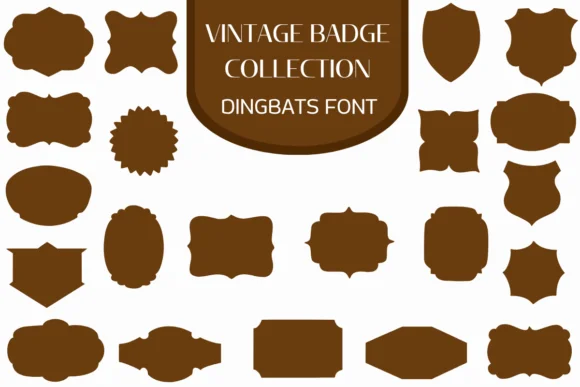
What makes these ornamental frames, shields, and decorative badge shapes distinctive is their retro character, one that carries the warmth of mid-century design without tipping into kitsch. Vintage Badge Collection by Heartcraft Atelier gathers over twenty of these silhouettes into a single dingbat font. Each shape in the collection functions as both a standalone decorative element and a framing device for type or imagery.
Available in both OTF and TTF formats, the collection gives you flexibility across Procreate, Affinity Photo, Affinity Designer, and other design tools. Designers reach for this set when building craft project labels, scrapbooking layouts, DIY market signage, and handmade product packaging where genuine retro character matters most. The badge shapes sit equally well on certificate borders, brewery label frames, vintage-inspired brand identity systems, and any design needing decorative structure without corporate polish. Since the collection renders as a font file, you can scale and recolor each badge to suit your exact layout, with no hunting through separate assets or wrestling with graphic files.
Anyone building a portfolio rooted in retro aesthetics, handmade authenticity, or mid-century visual warmth will find real use for these frames. Grab Vintage Badge Collection on Creative Fabrica and add them to your toolkit.
Style & Use Cases
- Overall Style
- Iconographic, Fonts
- Use Case
- Icons, Accents
- Ideal For
- ornaments, bullets, and decorative flourishes
- Pairs With
- any text font
How to Install Vintage Badge Collection Font
Step-by-step instructions for every platform
- 1Download the Vintage Badge Collection font file (.ttf or .otf).
- 2Locate the downloaded file in your Downloads folder.
- 3Right-click the font file.
- 4Select "Install" to install for the current user, or "Install for all users" to make it available system-wide.
- 5Vintage Badge Collection is now available in Word, Photoshop, Illustrator, and all other apps.
More by Heartcraft Atelier
View all →



Browse fonts by theme
Curated collections →Saw a font in a picture? Identify any font from an image with our free Font Finder.
More Dingbats Fonts
Browse all →







What pairs well with Vintage Badge Collection Font?
Vintage Badge Collection Font is a versatile dingbats font that works for both headings and body text. Pair it with a contrasting sans-serif or serif font to add visual interest and a clear distinction between titles and body copy.




Vintage Badge Collection Font
Reviewed by the FontBoxDL team · Updated June 2026