Firefox
 1 / 3
1 / 3Loading font…
About Veneer Extras Font
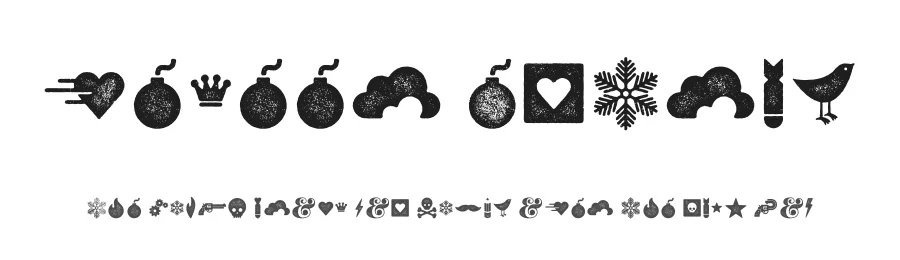
Veneer Extras from Yellow Design Studio is a funky set of high resolution hand-crafted letterpress dingbats. Because they're remarkably detailed, they looks great even at large sizes.
View and download the entire Veneer letterpress font family here:
https://yellowdesignstudio.com/collections/veneer/
The Veneer family is a hand-crafted letterpress font thats vintage and authentic with a touch of grunge. It includes Veneer, Veneer Two, and Veneer Three. Mix and match as desired to create realistic letterpress type. Its highly customizable, with six distress options for every letter and three for all other characters. Because its remarkably detailed, it looks great even at huge sizes. In addition, it includes a matching set of funky extras.
TIP: In Photoshop Veneer may look best with anti-aliasing set to smooth.
Style & Use Cases
- Overall Style
- Iconographic, Dingbats
- Use Case
- Icons, Accents
- Ideal For
- ornaments, bullets, and decorative flourishes
- Pairs With
- any text font
Veneer Extras Specifications
| Font Family | Veneer Extras |
| Style | Regular |
| Full Name | VeneerExtras |
| Version | 1.001 |
| Weight | 400 (Regular) |
| Glyph Count | 80 glyphs |
| PostScript Name | VeneerExtras |
| Designer | Ryan Martinson |
| Format | OTF (CFF) |
| File Size | 485.6 KB |
Languages Supported
Veneer Extras supports 91 languages.
How to Install Veneer Extras Font
Step-by-step instructions for every platform
- 1Download the Veneer Extras font file (.ttf or .otf).
- 2Locate the downloaded file in your Downloads folder.
- 3Right-click the font file.
- 4Select "Install" to install for the current user, or "Install for all users" to make it available system-wide.
- 5Veneer Extras is now available in Word, Photoshop, Illustrator, and all other apps.
More by Yellow Design Studio
View all →
Browse fonts by theme
Curated collections →Saw a font in a picture? Identify any font from an image with our free Font Finder.
More Dingbats Fonts
Browse all →







What pairs well with Veneer Extras Font?
Veneer Extras Font is a versatile dingbats font that works for both headings and body text. Pair it with a contrasting sans-serif or serif font to add visual interest and a clear distinction between titles and body copy.




Premium Dingbats Fonts
★ PremiumWant something with more weights, glyphs, and commercial polish? These premium dingbats fonts are worth a look.