 Firefox
 1 / 8
1 / 8About Vegetable Doodle Font
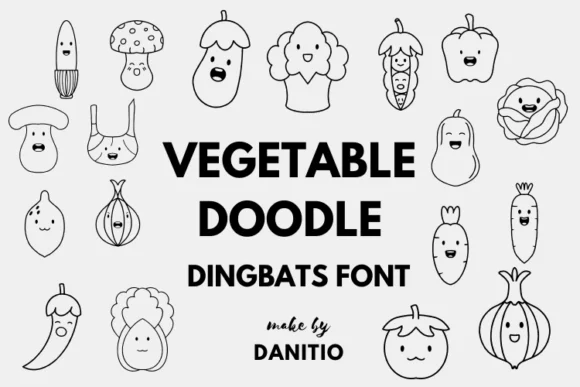
Playful and full of warmth, this dingbat collection brings hand-drawn vegetable characters straight into your designs. Vegetable Doodle by danita.kukkai includes tomatoes, carrots, corn, peppers, eggplants, lettuce, potatoes, and plenty of other garden produce rendered in a sketchy, rounded style that feels organic and genuinely approachable without being overly cute.
The character set works wonderfully for farmers market branding, organic food packaging labels, illustrated recipe card collections, and children's activity books. Kitchen textile designs for aprons or tea towels gain instant character, while garden party invitations and local produce delivery service graphics benefit from the casual, handmade aesthetic. DIY craft projects and small-batch food labels also come alive with these vegetables, especially when you want something that feels homemade rather than mass-produced.
The font arrives in both outline and filled versions (available in OTF and TTF formats), giving you real flexibility in how you layer or emphasize the individual vegetable characters. When you need readable body copy alongside these playful icons, pair the dingbats with a clean sans-serif typeface like Montserrat or Quicksand to keep things legible and visually balanced. The contrast between structured type and organic shapes creates breathing room on the page. Find Vegetable Doodle on Creative Fabrica and start bringing your produce-inspired designs to life.
Style & Use Cases
- Overall Style
- Iconographic, Doodle
- Use Case
- Icons, Accents
- Ideal For
- ornaments, bullets, and decorative flourishes
- Pairs With
- any text font
How to Install Vegetable Doodle Font
Step-by-step instructions for every platform
- 1Download the Vegetable Doodle font file (.ttf or .otf).
- 2Locate the downloaded file in your Downloads folder.
- 3Right-click the font file.
- 4Select "Install" to install for the current user, or "Install for all users" to make it available system-wide.
- 5Vegetable Doodle is now available in Word, Photoshop, Illustrator, and all other apps.
More by danita.kukkai
View all →
Browse fonts by theme
Curated collections →Saw a font in a picture? Identify any font from an image with our free Font Finder.
More Dingbats Fonts
Browse all →







What pairs well with Vegetable Doodle Font?
Vegetable Doodle Font is a versatile dingbats font that works for both headings and body text. Pair it with a contrasting sans-serif or serif font to add visual interest and a clear distinction between titles and body copy.




Vegetable Doodle Font
Reviewed by the FontBoxDL team · Updated July 2026