 Firefox
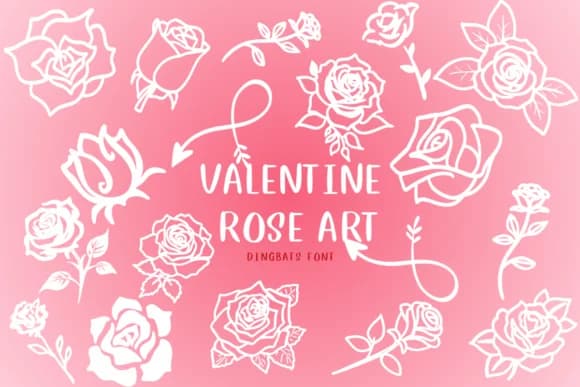 1 / 8
1 / 8About Valentine Rose Art Font
Valentine Rose Art from designer CHANOK replaces traditional letters with intricate rose illustrations, turning your keyboard into a botanical design element. This dingbat font lets every keystroke generate a different rose motif, making it surprisingly practical for building floral compositions without sourcing assets separately.
The actual use cases are varied. Build wedding invitation suites where the flowers do the talking, craft Valentine's Day greeting cards that feel individually lettered, design Etsy product packaging for small-batch candles or skincare lines, or create anniversary gift tags that read as thoughtfully made. Scrapbookers will find the roses work well for border elements and accents, while boutique stationery shops can layer them into custom correspondence sets. Fabric makers can use it for labeling handmade textiles. A single line of typed characters becomes a floral garland, eliminating the tedious hunt through graphics libraries.
You get natural visual rhythm from the variety built into the design, so even repetition reads as intentional rather than monotonous. Designers and makers working on romance-focused projects will appreciate how quickly they can add refined florals to their layouts. The font works whether you're designing on screen or hand-lettering a final piece on paper. Grab Valentine Rose Art from Creative Fabrica and add it to your growing collection of specialty typefaces that genuinely solve design problems.
Style & Use Cases
- Overall Style
- Iconographic, Red Rose
- Use Case
- Icons, Accents
- Ideal For
- ornaments, bullets, and decorative flourishes
- Pairs With
- any text font
How to Install Valentine Rose Art Font
Step-by-step instructions for every platform
- 1Download the Valentine Rose Art font file (.ttf or .otf).
- 2Locate the downloaded file in your Downloads folder.
- 3Right-click the font file.
- 4Select "Install" to install for the current user, or "Install for all users" to make it available system-wide.
- 5Valentine Rose Art is now available in Word, Photoshop, Illustrator, and all other apps.
More by CHANOK
View all →

Browse fonts by theme
Curated collections →Saw a font in a picture? Identify any font from an image with our free Font Finder.
More Dingbats Fonts
Browse all →







What pairs well with Valentine Rose Art Font?
Valentine Rose Art Font is a versatile dingbats font that works for both headings and body text. Pair it with a contrasting sans-serif or serif font to add visual interest and a clear distinction between titles and body copy.



Valentine Rose Art Font
by CHANOK
Reviewed by the FontBoxDL team · Updated July 2026