 Firefox
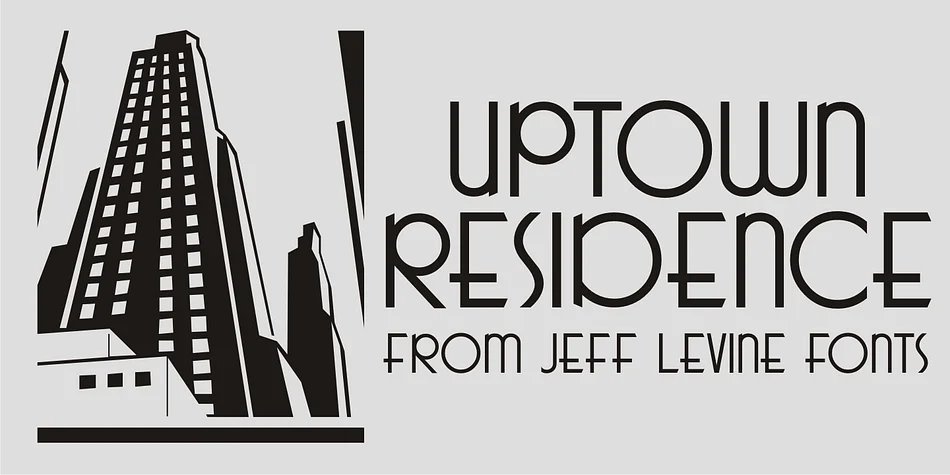
About UPTOWN RESIDENCE JNL Font
UPTOWN RESIDENCE JNL by Jeff Levine Fonts is a decorative typeface with roots in golden-age Hollywood design, specifically drawn from the title card of the 1940 film "Too Many Husbands." It captures that unmistakable Art Deco sensibility and refined elegance that defined cinema's most glamorous era.
The typeface brings authentic vintage sophistication to any project that demands retro glamour. Graphic designers consistently reach for it when creating vintage wedding invitation suites, speakeasy and cocktail lounge branding, art deco wedding programs, and luxury cosmetics packaging. The letterforms carry a polished, geometric quality that works beautifully when you want your design to evoke old Hollywood style without veering into kitsch territory.
Beyond invitations and packaging, this font translates well to book jacket design, vintage brand identity systems, and retro jazz club signage. The clean proportions and distinctive character give it versatility across both print and digital applications. If you're designing something that needs to feel authentically mid-century while maintaining strong readability, this typeface deserves a spot in your library. Grab UPTOWN RESIDENCE JNL from Creative Fabrica and bring that Hollywood golden age sensibility into your next project.
Style & Use Cases
- Overall Style
- Bold, Distinctive
- Use Case
- Headlines, Posters
- Ideal For
- logos, packaging, and standout titles
- Pairs With
- a neutral sans-serif
How to Install UPTOWN RESIDENCE JNL Font
Step-by-step instructions for every platform
- 1Download the UPTOWN RESIDENCE JNL font file (.ttf or .otf).
- 2Locate the downloaded file in your Downloads folder.
- 3Right-click the font file.
- 4Select "Install" to install for the current user, or "Install for all users" to make it available system-wide.
- 5UPTOWN RESIDENCE JNL is now available in Word, Photoshop, Illustrator, and all other apps.
More by Jeff Levine Fonts
View all →



Browse fonts by theme
Curated collections →Saw a font in a picture? Identify any font from an image with our free Font Finder.
More Decorative Fonts
Browse all →







What pairs well with UPTOWN RESIDENCE JNL Font?
UPTOWN RESIDENCE JNL Font is a decorative font that shines as a display or heading face. Pair it with a clean sans-serif or serif font for body text — the contrast creates a clear hierarchy while the two styles stay balanced and easy to read.




UPTOWN RESIDENCE JNL Font
Reviewed by the FontBoxDL team · Updated June 2026