 Firefox
About UPTOWN JNL Font
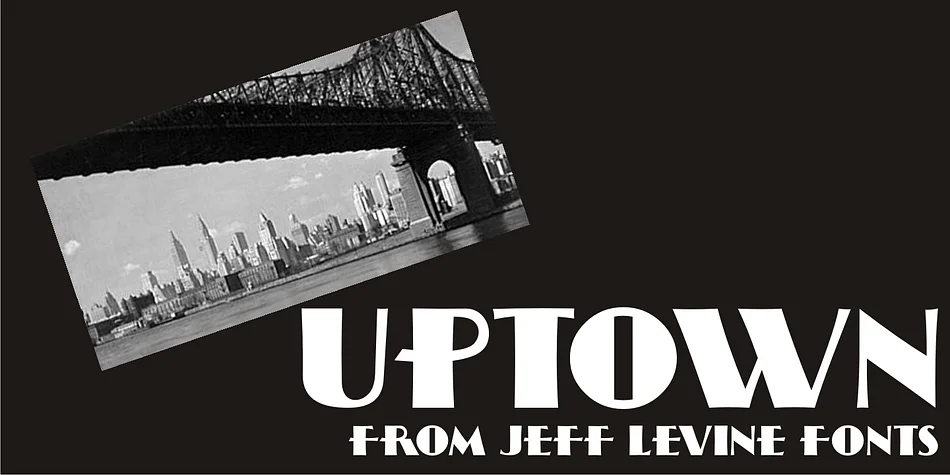
Picture yourself designing a sleek 1920s-inspired restaurant menu or premium packaging for a small-batch gin brand. UPTOWN JNL from Jeff Levine Fonts captures that classic Art Deco energy perfectly. The typeface traces back to lettering archives from 1944, when geometric precision and hand-lettered warmth defined the gold standard for upscale commercial design work.
What sets UPTOWN JNL apart is how the letterforms balance clean geometry with genuine personality throughout. You'll notice subtle curves that soften the otherwise angular letter structures, creating a hand-drawn quality that feels organic and authentic rather than cold or mechanical. This combination makes it exceptional for vintage-themed packaging labels, speakeasy and supper-club posters, art deco invitation suites, and retro cosmetics or artisanal fragrance branding where period authenticity really matters. The font reads with impressive impact at large display sizes, which proves crucial when you're creating signage or poster graphics that need to command attention immediately.
Whether you're developing a complete brand identity system or working on a single decorative project, UPTOWN JNL delivers the nostalgic sophistication that clients expect from period-accurate design. Every character maintains that distinctive hand-lettered warmth, ensuring visual consistency across all your applications. Find it on Creative Fabrica and add authentic 1940s style to your next project.
Style & Use Cases
- Overall Style
- Bold, Distinctive
- Use Case
- Headlines, Posters
- Ideal For
- logos, packaging, and standout titles
- Pairs With
- a neutral sans-serif
How to Install UPTOWN JNL Font
Step-by-step instructions for every platform
- 1Download the UPTOWN JNL font file (.ttf or .otf).
- 2Locate the downloaded file in your Downloads folder.
- 3Right-click the font file.
- 4Select "Install" to install for the current user, or "Install for all users" to make it available system-wide.
- 5UPTOWN JNL is now available in Word, Photoshop, Illustrator, and all other apps.
More by Jeff Levine Fonts
View all →



Browse fonts by theme
Curated collections →Saw a font in a picture? Identify any font from an image with our free Font Finder.
More Decorative Fonts
Browse all →







What pairs well with UPTOWN JNL Font?
UPTOWN JNL Font is a decorative font that shines as a display or heading face. Pair it with a clean sans-serif or serif font for body text — the contrast creates a clear hierarchy while the two styles stay balanced and easy to read.




UPTOWN JNL Font
Reviewed by the FontBoxDL team · Updated June 2026