 Firefox
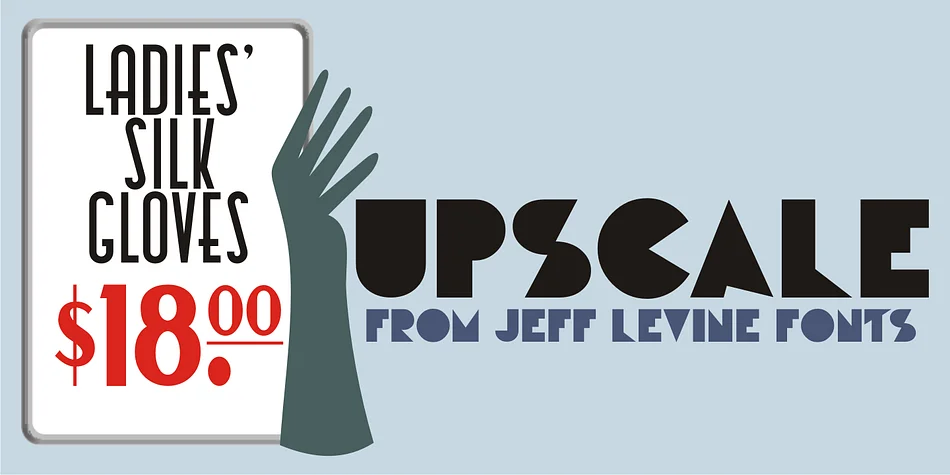
About UPSCALE JNL Font
There's a glamorous boldness that hits you when you see this typeface. Upscale JNL, designed by Jeff Levine Fonts, draws directly from a 1939 hand-lettered design that embodied everything about Art Deco: clean geometry, solid letterforms, and an almost architectural confidence that made luxury feel bold rather than delicate.
The font channels the distinctive aesthetic of Streamline era establishments, from high-end department store signage to speakeasy bar menus, high-end night clubs to fine millinery shops. In practical terms, it shines on art deco wedding invitation suites with geometric borders and accents, custom signage for vintage-inspired cafes and restaurants, luxury cosmetics packaging with that classic 1930s glamour touch, and boutique branding for high-end antique shops or estate sales. The counter-less design keeps everything clean and readable at any size. What made this lettering style so enduring was its combination of character and strong presence, working equally well setting a headline or standing alone as a bold, confident statement.
Pair Upscale JNL with a refined serif or understated sans-serif to balance its dramatic character when you need text with longer reading passages. The contrast makes both work better. You'll find Upscale JNL on Creative Fabrica, ready to add authentic Art Deco presence to your projects.
Style & Use Cases
- Overall Style
- Bold, Distinctive
- Use Case
- Headlines, Posters
- Ideal For
- logos, packaging, and standout titles
- Pairs With
- a neutral sans-serif
How to Install UPSCALE JNL Font
Step-by-step instructions for every platform
- 1Download the UPSCALE JNL font file (.ttf or .otf).
- 2Locate the downloaded file in your Downloads folder.
- 3Right-click the font file.
- 4Select "Install" to install for the current user, or "Install for all users" to make it available system-wide.
- 5UPSCALE JNL is now available in Word, Photoshop, Illustrator, and all other apps.
More by Jeff Levine Fonts
View all →



Browse fonts by theme
Curated collections →Saw a font in a picture? Identify any font from an image with our free Font Finder.
More Decorative Fonts
Browse all →







What pairs well with UPSCALE JNL Font?
UPSCALE JNL Font is a decorative font that shines as a display or heading face. Pair it with a clean sans-serif or serif font for body text — the contrast creates a clear hierarchy while the two styles stay balanced and easy to read.




UPSCALE JNL Font
Reviewed by the FontBoxDL team · Updated June 2026