 Firefox
 1 / 7
1 / 7About Ups Down Font
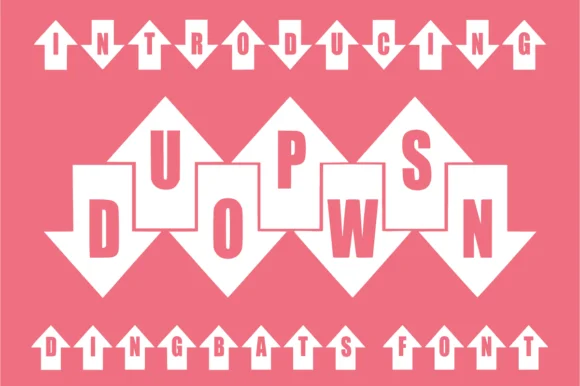
Ups Down by anamalmusyaffaCreative is a dingbat font built around arrow glyphs with readable letterforms tucked inside each shape. The concept is straightforward but genuinely useful: every character becomes a graphical element, so you get both symbol and text functionality from a single typeface without hunting for separate graphic assets.
This dual-purpose design works particularly well for animation headers, comic book titles, and children's book illustrations, where visual impact matters as much as readability. The font also delivers solid results in sublimation projects on apparel and drinkware, DIY craft signage, packaging label work, and decorative logo systems where directional symbolism strengthens your message. Because each character is already a complete icon, you can layer Ups Down as a pure decorative element over your layouts without reaching for additional graphics. The versatility comes from that built-in duality: readable when you need it, purely ornamental when that serves the design better.
The arrow motif throughout gives the whole design an intentional, contemporary energy that balances playfulness with structure. These shapes work equally well in animated projects and static ones, for ornamental and functional purposes. If you need directional symbols that also function as letters, Creative Fabrica has Ups Down ready for your next project.
Style & Use Cases
- Overall Style
- Iconographic, Ups Down
- Use Case
- Icons, Accents
- Ideal For
- ornaments, bullets, and decorative flourishes
- Pairs With
- any text font
How to Install Ups Down Font
Step-by-step instructions for every platform
- 1Download the Ups Down font file (.ttf or .otf).
- 2Locate the downloaded file in your Downloads folder.
- 3Right-click the font file.
- 4Select "Install" to install for the current user, or "Install for all users" to make it available system-wide.
- 5Ups Down is now available in Word, Photoshop, Illustrator, and all other apps.
More by anamalmusyaffaCreative
View all →
Browse fonts by theme
Curated collections →Saw a font in a picture? Identify any font from an image with our free Font Finder.
More Dingbats Fonts
Browse all →







What pairs well with Ups Down Font?
Ups Down Font is a versatile dingbats font that works for both headings and body text. Pair it with a contrasting sans-serif or serif font to add visual interest and a clear distinction between titles and body copy.




Ups Down Font
Reviewed by the FontBoxDL team · Updated June 2026