 Firefox
About Type Keys Pro Font
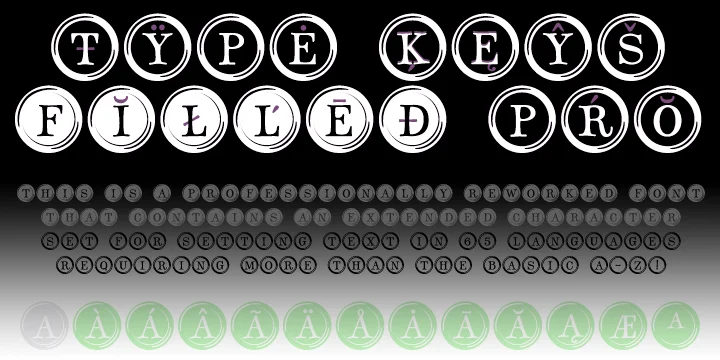
Type Keys Pro by CheapProFonts channels the satisfying clack and mechanical charm of mid-century typewriters through a collection of bold, pixelated key characters. Each glyph mimics the look of actual typewriter keys, bringing nostalgic texture and authentic period detail to your work. What sets this dingbat font apart is its extended character set that goes well beyond a basic alphabet, giving you far more creative flexibility than typical key-inspired typefaces.
You'll find this collection works beautifully for vintage wedding invitation suites, where one or two key characters can add a quirky touch to envelope liners or RSVP cards. Retro coffee shop menus benefit from these characters as decorative breaks between sections, while DIY typewriter key necklace designs and scrapbook embellishments make natural homes for the full glyph range. It's equally at home on steampunk-themed poster projects or as decorative elements in vintage blog headers where you want to signal craft and authenticity.
The font works best for designers and hobbyists chasing a decidedly retro aesthetic who aren't worried about every glyph landing perfectly at word starts (part of the playful charm, honestly). Pick up Type Keys Pro on Creative Fabrica and add a shot of typewriter authenticity to your next project.
Style & Use Cases
- Overall Style
- Iconographic
- Use Case
- Icons, Accents
- Ideal For
- ornaments, bullets, and decorative flourishes
- Pairs With
- any text font
How to Install Type Keys Pro Font
Step-by-step instructions for every platform
- 1Download the Type Keys Pro font file (.ttf or .otf).
- 2Locate the downloaded file in your Downloads folder.
- 3Right-click the font file.
- 4Select "Install" to install for the current user, or "Install for all users" to make it available system-wide.
- 5Type Keys Pro is now available in Word, Photoshop, Illustrator, and all other apps.
More by CheapProFonts
View all →
Browse fonts by theme
Curated collections →Saw a font in a picture? Identify any font from an image with our free Font Finder.
More Dingbats Fonts
Browse all →







What pairs well with Type Keys Pro Font?
Type Keys Pro Font is a versatile dingbats font that works for both headings and body text. Pair it with a contrasting sans-serif or serif font to add visual interest and a clear distinction between titles and body copy.




Type Keys Pro Font
Reviewed by the FontBoxDL team · Updated August 2026