
 1 / 8
1 / 8About Trees 2.0 Font
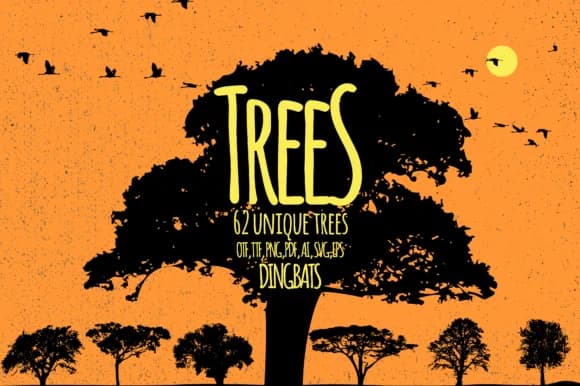
Trees 2.0 from Minimalistartstudio is a dingbats typeface built on a straightforward premise: each letterform becomes a different tree silhouette. Type a capital letter and get one tree variation, switch to lowercase for another distinct shape, then add numbers for even more options. The collection of variations means you can compose whole forests of unique tree outlines without needing to hunt through multiple image libraries or resize shapes endlessly.
The real advantage is the speed and flexibility this gives your workflow. For woodland greeting card suites, you can layer trees directly into the design. Herbalist and apothecary labels gain instant botanical credibility. Forest-themed social media graphics come together faster when you're not sourcing and positioning individual tree images. Seasonal packaging with botanical motifs feels more cohesive when every tree element comes from the same typographic source.
This typeface speaks to designers working in nature-focused industries, botanical illustration, and organic branding. The letterforms deliver instant visual variety and a handcrafted quality that resonates with eco-conscious audiences and DIY makers. The capitals, lowercase, and numbers give you enough variation to build something that feels genuinely composed rather than templated. Find it on Creative Fabrica and start building visuals that feel designed rather than borrowed.
Style & Use Cases
- Overall Style
- Iconographic, Tree
- Use Case
- Icons, Accents
- Ideal For
- ornaments, bullets, and decorative flourishes
- Pairs With
- any text font
How to Install Trees 2.0 Font
Step-by-step instructions for every platform
- 1Download the Trees 2.0 font file (.ttf or .otf).
- 2Locate the downloaded file in your Downloads folder.
- 3Right-click the font file.
- 4Select "Install" to install for the current user, or "Install for all users" to make it available system-wide.
- 5Trees 2.0 is now available in Word, Photoshop, Illustrator, and all other apps.
More by Minimalistartstudio
View all →



Browse fonts by theme
Curated collections →Saw a font in a picture? Identify any font from an image with our free Font Finder.
More Dingbats Fonts
Browse all →







What pairs well with Trees 2.0 Font?
Trees 2.0 Font is a versatile dingbats font that works for both headings and body text. Pair it with a contrasting sans-serif or serif font to add visual interest and a clear distinction between titles and body copy.



Trees 2.0 Font
Reviewed by the FontBoxDL team · Updated July 2026