 Firefox
 1 / 5
1 / 5About TRANSIT STATION JNL Font
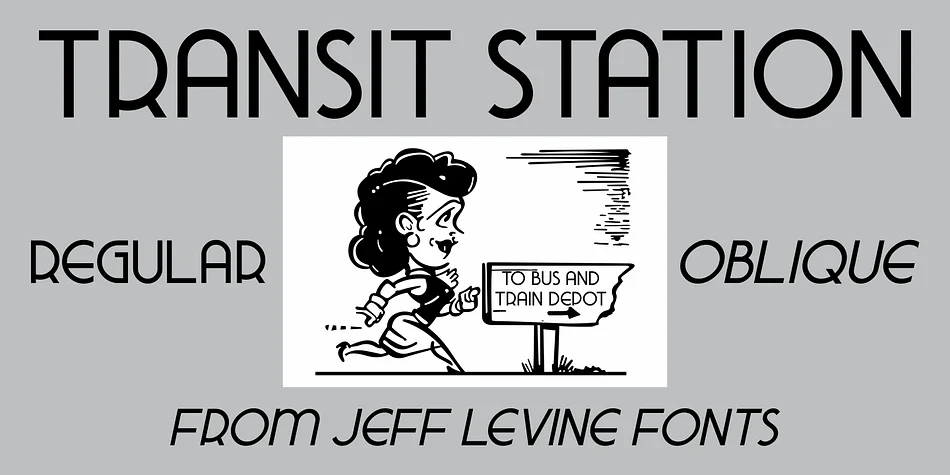
Jazz-age geometric forms with a refined, elongated quality define TRANSIT STATION JNL, created by Jeff Levine Fonts. The typeface draws its distinctive character from a vintage neon sign photographed above a Greyhound bus terminal entrance in Depression-era Manhattan, capturing that precise moment when industrial modernity met graphic elegance. The designer's eye for period authenticity shows throughout. Both regular and oblique versions give you flexibility depending on your project needs.
This is the font for anyone genuinely chasing that 1930s Brooklyn vibe without leaning on tired retro tropes. Art deco hotel branding, speakeasy-themed event posters, luxury cosmetics packaging, and sophisticated invitation suites all come alive when you use this typeface's thin, elegant letterforms. The elongated strokes have genuine impact on everything from heritage wine labels to indie record covers to period-accurate book designs. Designers tackling Gatsby-inspired projects or work requiring authentic pre-war visual DNA find this design delivers what they're actually looking for.
The typeface suits graphic designers and craft enthusiasts tackling heritage branding and period-conscious design projects. Its thin, refined character captures the distinctive neon-era aesthetic that luxury brand work and packaging truly demand. Find TRANSIT STATION JNL on Creative Fabrica to add this 1930s-inspired classic to your toolkit.
Style & Use Cases
- Overall Style
- Bold, Distinctive
- Use Case
- Headlines, Posters
- Ideal For
- logos, packaging, and standout titles
- Pairs With
- a neutral sans-serif
How to Install TRANSIT STATION JNL Font
Step-by-step instructions for every platform
- 1Download the TRANSIT STATION JNL font file (.ttf or .otf).
- 2Locate the downloaded file in your Downloads folder.
- 3Right-click the font file.
- 4Select "Install" to install for the current user, or "Install for all users" to make it available system-wide.
- 5TRANSIT STATION JNL is now available in Word, Photoshop, Illustrator, and all other apps.
More by Jeff Levine Fonts
View all →



Browse fonts by theme
Curated collections →Saw a font in a picture? Identify any font from an image with our free Font Finder.
More Decorative Fonts
Browse all →







What pairs well with TRANSIT STATION JNL Font?
TRANSIT STATION JNL Font is a decorative font that shines as a display or heading face. Pair it with a clean sans-serif or serif font for body text — the contrast creates a clear hierarchy while the two styles stay balanced and easy to read.




TRANSIT STATION JNL Font
Reviewed by the FontBoxDL team · Updated June 2026