 Firefox
About TOWN AND COUNTRY JNL Font
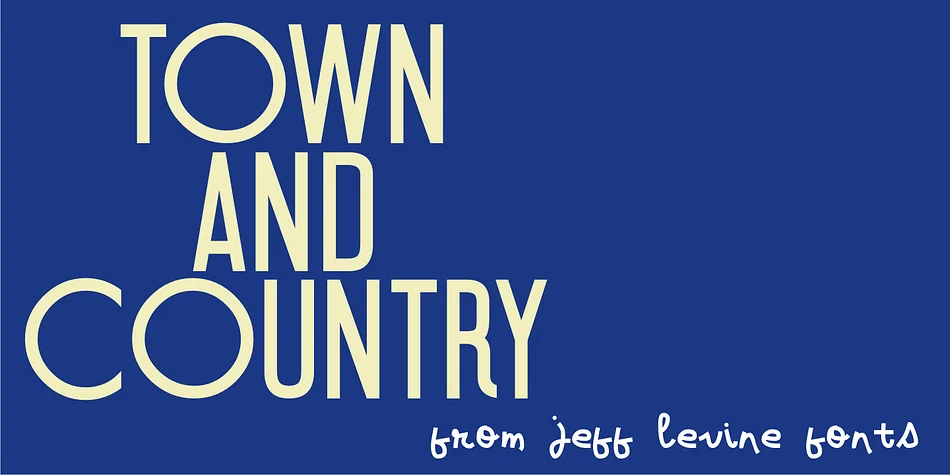
Block and rounded letterforms share the stage in this decorative typeface, each style holding its own while creating something surprisingly cohesive. TOWN AND COUNTRY JNL from Jeff Levine Fonts draws directly from 1940s Art Deco hand-lettering, specifically modeled after a sheet music title that paired geometric and organic forms without compromise.
This hybrid approach shouldn't work by conventional typography rules, but it does. The structured blocks and flowing curves balance each other, delivering personality and visual interest without sacrificing legibility. The result works beautifully across a range of vintage-inspired projects: speakeasy and cocktail bar menus, board game packaging with period charm, wedding invitation suites with authentic 1940s flair, and decorative poster designs that lean into retro aesthetics. You can also apply it to scrapbooking layouts, art deco gift labels, exhibition materials, and event signage that needs genuine mid-century character.
This is the font for designers and creatives building historically-informed work. The mix gives you flexibility: you can emphasize the geometric structure for a controlled feel or lean into the softer curves for warmth, depending on your design direction. Choose TOWN AND COUNTRY JNL when you need unmistakable period authenticity without feeling forced or overly trendy. Find it on Creative Fabrica.
Style & Use Cases
- Overall Style
- Bold, Distinctive
- Use Case
- Headlines, Posters
- Ideal For
- logos, packaging, and standout titles
- Pairs With
- a neutral sans-serif
How to Install TOWN AND COUNTRY JNL Font
Step-by-step instructions for every platform
- 1Download the TOWN AND COUNTRY JNL font file (.ttf or .otf).
- 2Locate the downloaded file in your Downloads folder.
- 3Right-click the font file.
- 4Select "Install" to install for the current user, or "Install for all users" to make it available system-wide.
- 5TOWN AND COUNTRY JNL is now available in Word, Photoshop, Illustrator, and all other apps.
More by Jeff Levine Fonts
View all →



Browse fonts by theme
Curated collections →Saw a font in a picture? Identify any font from an image with our free Font Finder.
More Decorative Fonts
Browse all →







What pairs well with TOWN AND COUNTRY JNL Font?
TOWN AND COUNTRY JNL Font is a decorative font that shines as a display or heading face. Pair it with a clean sans-serif or serif font for body text — the contrast creates a clear hierarchy while the two styles stay balanced and easy to read.




TOWN AND COUNTRY JNL Font
Reviewed by the FontBoxDL team · Updated June 2026