 Firefox
 1 / 7
1 / 7About Torn Paper Font
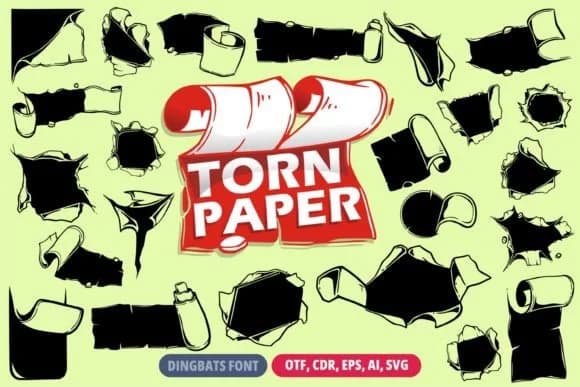
Torn Paper by onoborgol is a dingbats font built around torn paper shapes and ragged edges that work as decorative elements across your designs. Rather than functioning as letters, these are hand-drawn torn paper pieces with authentic-looking tears, holes, and worn edges that effectively simulate the texture of manual collage work. It's perfect for designers who need that tactile, crafted visual quality without spending hours manually creating torn paper layers and effects in their design software.
Use it for scrapbooking page layouts, children's book illustrations, comic book panel accents, and quirky greeting card designs where that torn quality adds genuine character and visual interest to the composition. The outline style gives you total flexibility to apply any color you want, layer multiple pieces strategically, or place them against photography for added depth and dimension. These torn shapes work equally well as packaging accents on handmade product labels, decorative elements on DIY craft signage, or texture additions to vintage poster designs and mixed-media collages. The hand-drawn aesthetic keeps everything looking intentional and illustrated rather than digital or sterile, which matters a lot when you're targeting handmade or boutique markets. You'll find it on Creative Fabrica whenever you need hand-drawn torn paper elements for your next project.
Style & Use Cases
- Overall Style
- Iconographic, Paper
- Use Case
- Icons, Accents
- Ideal For
- ornaments, bullets, and decorative flourishes
- Pairs With
- any text font
How to Install Torn Paper Font
Step-by-step instructions for every platform
- 1Download the Torn Paper font file (.ttf or .otf).
- 2Locate the downloaded file in your Downloads folder.
- 3Right-click the font file.
- 4Select "Install" to install for the current user, or "Install for all users" to make it available system-wide.
- 5Torn Paper is now available in Word, Photoshop, Illustrator, and all other apps.
More by onoborgol
View all →
Browse fonts by theme
Curated collections →Saw a font in a picture? Identify any font from an image with our free Font Finder.
More Dingbats Fonts
Browse all →







What pairs well with Torn Paper Font?
Torn Paper Font is a versatile dingbats font that works for both headings and body text. Pair it with a contrasting sans-serif or serif font to add visual interest and a clear distinction between titles and body copy.



Torn Paper Font
by onoborgol
Reviewed by the FontBoxDL team · Updated July 2026