 Firefox
 1 / 7
1 / 7Loading font…
About Sad Doodle Font
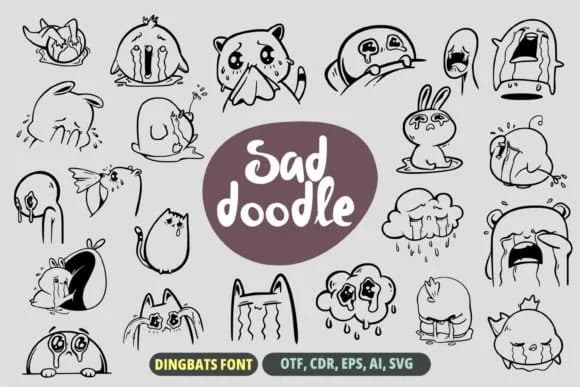
Sad Doodle by onoborgol is a hand-drawn icon font that captures the real charm of casual sketching with authentic emotional honesty. Each character is a small, relatable moment brought to life on the page, ready to do meaningful work in your projects. This typeface excels where personality actually matters: greeting cards for honest conversations instead of generic sentiment, sticker sets for messaging apps and social platforms, journal layouts that say what you actually feel, and custom t-shirt designs where imperfection reads as authenticity rather than carelessness.
The outlines remain clean and visible at every size, so these doodles translate smoothly from product labels to packaging design to anything living on screen. You get the full emotional range of little drawings, from melancholic to mischievous, giving you genuine flexibility in pairing them with text that needs feeling. This is the kind of typeface that brings actual personality to a design instead of feeling templated, corporate, or borrowed from some generic library shelf.
When you need to soften a message or add some real feeling to your work, this font delivers without pretense or irony. Grab Sad Doodle on Creative Fabrica and start building designs that feel like they were drawn by someone who actually cares.
Style & Use Cases
- Overall Style
- Iconographic, Sad
- Use Case
- Icons, Accents
- Ideal For
- ornaments, bullets, and decorative flourishes
- Pairs With
- any text font
How to Install Sad Doodle Font
Step-by-step instructions for every platform
- 1Download the Sad Doodle font file (.ttf or .otf).
- 2Locate the downloaded file in your Downloads folder.
- 3Right-click the font file.
- 4Select "Install" to install for the current user, or "Install for all users" to make it available system-wide.
- 5Sad Doodle is now available in Word, Photoshop, Illustrator, and all other apps.
More by onoborgol
View all →
Browse fonts by theme
Curated collections →Saw a font in a picture? Identify any font from an image with our free Font Finder.
More Dingbats Fonts
Browse all →







What pairs well with Sad Doodle Font?
Sad Doodle Font is a versatile dingbats font that works for both headings and body text. Pair it with a contrasting sans-serif or serif font to add visual interest and a clear distinction between titles and body copy.



Sad Doodle Font
by onoborgol
Reviewed by the FontBoxDL team · Updated October 2026