 Firefox
 1 / 8
1 / 8About Top Hat Font
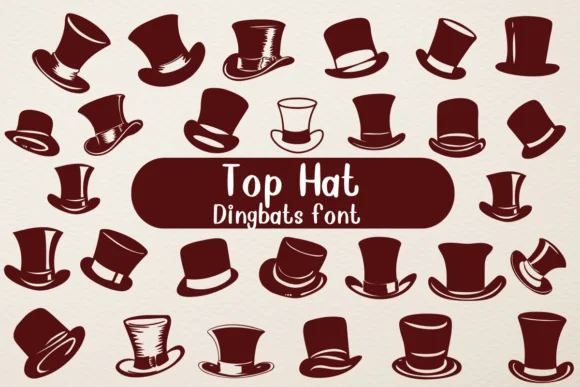
Imagine designing a speakeasy-themed invitation or a luxury gift box label that evokes 1920s glamour. Top Hat, created by Nongyao, is a dingbat font where each character key triggers a different top hat silhouette, giving you a whole wardrobe of hat styles to work with. Rather than traditional letters, you get elegant hat variations that speak to nobility and classical refinement.
This font works brilliantly for vintage wedding invitation suites where you need decorative elements that feel intentional and themed. It's equally at home on roaring 20s party posters, retro packaging for luxury goods, or boutique stationery sets meant to evoke old-money elegance. The silhouette-based approach means these hats pair nicely with serif and script fonts, layering them into your designs without fighting for visual space.
Available in both OTF and TTF formats, Top Hat gives you a full range of hat variations across its character set, so you can mix and match styles within a single design. Building a single accent or filling an entire pattern, you'll find the consistent retro vocabulary keeps everything cohesive. Grab it from Creative Fabrica to add that touch of classical charm to your next project.
Style & Use Cases
- Overall Style
- Iconographic, Fonts
- Use Case
- Icons, Accents
- Ideal For
- ornaments, bullets, and decorative flourishes
- Pairs With
- any text font
How to Install Top Hat Font
Step-by-step instructions for every platform
- 1Download the Top Hat font file (.ttf or .otf).
- 2Locate the downloaded file in your Downloads folder.
- 3Right-click the font file.
- 4Select "Install" to install for the current user, or "Install for all users" to make it available system-wide.
- 5Top Hat is now available in Word, Photoshop, Illustrator, and all other apps.

Browse fonts by theme
Curated collections →Saw a font in a picture? Identify any font from an image with our free Font Finder.
More Dingbats Fonts
Browse all →






What pairs well with Top Hat Font?
Top Hat Font is a versatile dingbats font that works for both headings and body text. Pair it with a contrasting sans-serif or serif font to add visual interest and a clear distinction between titles and body copy.




Top Hat Font
by Nongyao
Reviewed by the FontBoxDL team · Updated July 2026