 Firefox
 1 / 8
1 / 8About Tombstones Font
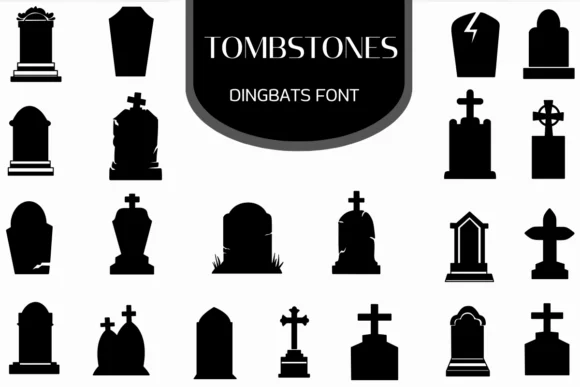
You're designing a haunted house event kit and need symbols that read as genuinely spooky without tipping into cartoonish territory. Tombstones by Heartcraft Atelier solves that challenge with a dingbat collection built on clean silhouettes of crosses, gravestones, and cemetery markers rendered in bold, solid black.
Where this font excels is in the balance between detail and legibility. Each tombstone and architectural element holds its own visually, working equally well at small sizes on Halloween invitation suites or enlarged for horror podcast cover art, gaming graphics, and themed packaging. Careful linework and smooth fills render consistently across screen and print, giving you crisp symbols without distortion or softness muddying the appearance. That consistency becomes essential when you're building a cohesive visual language around darker aesthetics.
Seasonal work is just the beginning. Cemetery map illustrations, gothic wedding stationery, memorial program layouts, and vintage horror merchandise all benefit from having these iconic shapes ready to use. You get the raw material to build an atmosphere that feels historically grounded rather than purely Halloween kitsch. A comprehensive glyph set gives you flexibility in how you layer them. Find Tombstones on Creative Fabrica and start building depth into your darker designs.
Style & Use Cases
- Overall Style
- Iconographic, Fonts
- Use Case
- Icons, Accents
- Ideal For
- ornaments, bullets, and decorative flourishes
- Pairs With
- any text font
How to Install Tombstones Font
Step-by-step instructions for every platform
- 1Download the Tombstones font file (.ttf or .otf).
- 2Locate the downloaded file in your Downloads folder.
- 3Right-click the font file.
- 4Select "Install" to install for the current user, or "Install for all users" to make it available system-wide.
- 5Tombstones is now available in Word, Photoshop, Illustrator, and all other apps.
More by Heartcraft Atelier
View all →



Browse fonts by theme
Curated collections →Saw a font in a picture? Identify any font from an image with our free Font Finder.
More Dingbats Fonts
Browse all →







What pairs well with Tombstones Font?
Tombstones Font is a versatile dingbats font that works for both headings and body text. Pair it with a contrasting sans-serif or serif font to add visual interest and a clear distinction between titles and body copy.




Tombstones Font
Reviewed by the FontBoxDL team · Updated June 2026