 Firefox
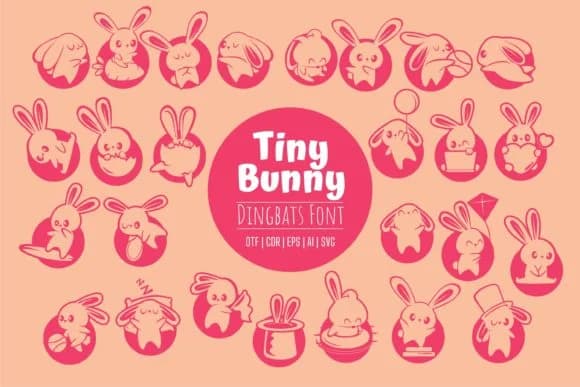 1 / 5
1 / 5About Tiny Bunny Font
Tiny Bunny by Onoborgol is a cute animal dingbat font packed with rabbit and bunny characters that bring a playful charm to any design. The small, detailed icons work beautifully at any scale, making them ideal for layering over text or standing alone as decorative elements.
This font shines in craft projects where a lighthearted touch matters. Scrapbooking layouts get instant personality with these bunny shapes filling out borders and accent spaces. Gift tags and greeting cards become something special when you combine the characters with hand-lettering or simple type. Planner stickers and journal spreads benefit from the variety too, giving you little motifs to organize sections or mark special moments. Designers working on children's book illustrations find the font particularly useful because the rabbits convey friendliness without feeling babyish. Same goes for Etsy shop listings selling Easter-themed or nature-focused items. Sticker sheet designs, coloring page assets, and even small nursery decals all pop with these elements.
The cohesive character set means you can build whole visual systems around the bunnies rather than hunting for complementary icons elsewhere. If you're looking for a playful dingbat toolkit that brings warmth to your hand-lettered and illustrated work, Tiny Bunny deserves a spot in your collection. Grab it from Creative Fabrica and start designing.
Style & Use Cases
- Overall Style
- Iconographic, Tiny
- Use Case
- Icons, Accents
- Ideal For
- ornaments, bullets, and decorative flourishes
- Pairs With
- any text font
How to Install Tiny Bunny Font
Step-by-step instructions for every platform
- 1Download the Tiny Bunny font file (.ttf or .otf).
- 2Locate the downloaded file in your Downloads folder.
- 3Right-click the font file.
- 4Select "Install" to install for the current user, or "Install for all users" to make it available system-wide.
- 5Tiny Bunny is now available in Word, Photoshop, Illustrator, and all other apps.
More by Onoborgol
View all →
Browse fonts by theme
Curated collections →Saw a font in a picture? Identify any font from an image with our free Font Finder.
More Dingbats Fonts
Browse all →







What pairs well with Tiny Bunny Font?
Tiny Bunny Font is a versatile dingbats font that works for both headings and body text. Pair it with a contrasting sans-serif or serif font to add visual interest and a clear distinction between titles and body copy.



Tiny Bunny Font
by Onoborgol
Reviewed by the FontBoxDL team · Updated July 2026