 Firefox
 1 / 7
1 / 7About Cute Dandelion Font
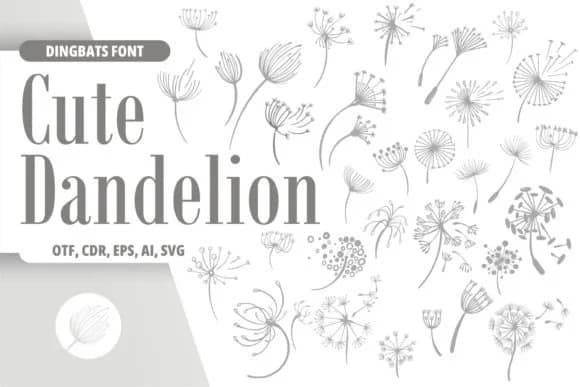
You're arranging a nature-inspired wedding suite and need decorative elements that feel organic rather than generic. Cute Dandelion by Onoborgol delivers hand-drawn dandelion illustrations as a dingbat font, giving you character-based botanical graphics you can place directly into layouts. The font works as both outlines and line art versions, offering flexibility depending on whether you want solid fills or delicate stroke effects for your design.
The glyphs shine across several applications. Wedding invitation borders and botanical thank-you cards work well, especially where traditional florals can feel predictable. Pressed flower-themed scrapbooking pages benefit from the loose, organic quality of each character. Product labels for seed packets, herbal blends, or artisanal skincare packaging align with the illustrated style. Even simple signage in a garden center or nature shop gains visual interest from the hand-drawn character set that feels less corporate than typical display fonts.
Since each glyph is a complete illustration rather than text, you get instant decorative elements without hunting for separate graphics. The line and outline variants let you adapt to different design contexts, whether you're working at small label sizes or large format prints. Pick Cute Dandelion from Creative Fabrica to start integrating these botanical characters into your next project.
Style & Use Cases
- Overall Style
- Iconographic, Dandelion
- Use Case
- Icons, Accents
- Ideal For
- ornaments, bullets, and decorative flourishes
- Pairs With
- any text font
How to Install Cute Dandelion Font
Step-by-step instructions for every platform
- 1Download the Cute Dandelion font file (.ttf or .otf).
- 2Locate the downloaded file in your Downloads folder.
- 3Right-click the font file.
- 4Select "Install" to install for the current user, or "Install for all users" to make it available system-wide.
- 5Cute Dandelion is now available in Word, Photoshop, Illustrator, and all other apps.
More by Onoborgol
View all →
Browse fonts by theme
Curated collections →Saw a font in a picture? Identify any font from an image with our free Font Finder.
More Dingbats Fonts
Browse all →







What pairs well with Cute Dandelion Font?
Cute Dandelion Font is a versatile dingbats font that works for both headings and body text. Pair it with a contrasting sans-serif or serif font to add visual interest and a clear distinction between titles and body copy.



Cute Dandelion Font
by Onoborgol
Reviewed by the FontBoxDL team · Updated June 2026