
 1 / 8
1 / 8About The Thuressia Script Font
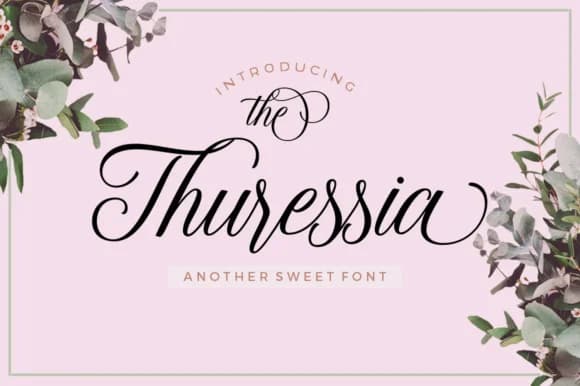
The Thuressia Script Font by Picatype Studio is a contemporary calligraphy typeface that balances sophisticated elegance with genuine approachability, characterized by flowing letterforms and ornamental swashes that add dimensional visual interest to creative compositions and design layouts across multiple mediums and applications.
Whether you're crafting wedding invitation suites that require an organic, hand-lettered feel, creating product labels for Etsy sellers seeking marketplace discoverability, or designing boutique skincare and cosmetics packaging that conveys artisanal quality and careful attention to detail, Thuressia brings refined character to every project. The typeface offers extensive swash variations and alternatives, allowing designers to customize individual letterforms and create visually distinctive branding moments across coordinated stationery, product packaging, and digital touchpoints. This flexibility helps maintain visual cohesion across brand systems while adding uniquely personalized touches to professional designs.
The script particularly excels in specialized applications including hand-lettered craft signage for boutique retail spaces, personalized greeting card designs, and editorial headline treatments where contemporary calligraphic elegance meaningfully enhances storytelling. From luxury brand websites to bespoke event invitations and special occasion materials, Thuressia's letterforms communicate both warmth and sophistication without feeling overly formal or dated. Discover The Thuressia Script Font on Creative Fabrica to add refined contemporary calligraphy to your creative work.
Style & Use Cases
- Overall Style
- Elegant, Flowing, The Thuressia
- Use Case
- Invitations, Branding
- Ideal For
- wedding stationery, greeting cards, and signatures
- Pairs With
- a simple uppercase sans
How to Install The Thuressia Script Font Font
Step-by-step instructions for every platform
- 1Download the The Thuressia Script Font font file (.ttf or .otf).
- 2Locate the downloaded file in your Downloads folder.
- 3Right-click the font file.
- 4Select "Install" to install for the current user, or "Install for all users" to make it available system-wide.
- 5The Thuressia Script Font is now available in Word, Photoshop, Illustrator, and all other apps.
More by Picatype Studio
View all →
More Script Handwritten Fonts
Browse all →







What pairs well with The Thuressia Script Font?
The Thuressia Script Font is a script font that shines as a display or heading face. Pair it with a clean sans-serif or serif font for body text — the contrast creates a clear hierarchy while the two styles stay balanced and easy to read.



The Thuressia Script Font
Reviewed by the FontBoxDL team · Updated May 2026