
 1 / 5
1 / 5About The Ninth Valley Font
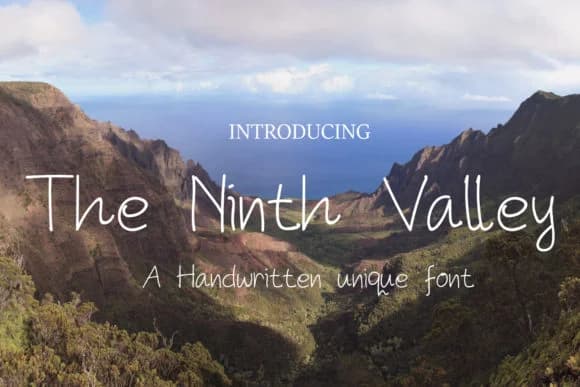
The Ninth Valley by DawnCreative.id is a modern handwritten script that brings a contemporary yet organic quality to digital and print projects. This font works exceptionally well for wedding invitation suites where its flowing letterforms create an intimate, personal touch that resonates with guests. It's equally suited for Instagram Stories, lifestyle brand graphics, and artisanal product packaging design, particularly for cosmetics, tea blends, or boutique stationery lines that want to establish a handcrafted aesthetic. The natural pen-stroke quality translates beautifully into watermark overlays, event signage, and lyric graphics for music creators seeking visual authenticity. What makes The Ninth Valley distinctive is its balance between handcrafted authenticity and modern sensibility. The letterforms maintain enough consistency for branding applications while preserving the warmth that makes handwritten fonts resonate emotionally with audiences. Whether you're designing greeting cards, creating inspirational quote graphics, or developing visual assets for a personal brand, this script adapts to both minimalist and ornate layouts without losing its character. The Ninth Valley's versatility extends to music playlist covers, journal spreads, and lifestyle photography overlays where a personal touch enhances the visual narrative. For small business owners and independent creatives, this font delivers the artisanal quality that modern consumers increasingly seek in packaging and digital presence. Get The Ninth Valley Font on Creative Fabrica and add this handwritten script to your design toolkit for projects that demand authentic, contemporary character.
Style & Use Cases
- Overall Style
- Elegant, Flowing, The Ninth Valley
- Use Case
- Invitations, Branding
- Ideal For
- wedding stationery, greeting cards, and signatures
- Pairs With
- a simple uppercase sans
How to Install The Ninth Valley Font Font
Step-by-step instructions for every platform
- 1Download the The Ninth Valley Font font file (.ttf or .otf).
- 2Locate the downloaded file in your Downloads folder.
- 3Right-click the font file.
- 4Select "Install" to install for the current user, or "Install for all users" to make it available system-wide.
- 5The Ninth Valley Font is now available in Word, Photoshop, Illustrator, and all other apps.
More by DawnCreative.id
View all →
More Script Handwritten Fonts
Browse all →







What pairs well with The Ninth Valley Font?
The Ninth Valley Font is a script font that shines as a display or heading face. Pair it with a clean sans-serif or serif font for body text — the contrast creates a clear hierarchy while the two styles stay balanced and easy to read.



The Ninth Valley Font
Reviewed by the FontBoxDL team · Updated May 2026