 Firefox
 1 / 5
1 / 5About The Mumbai Sticker Font
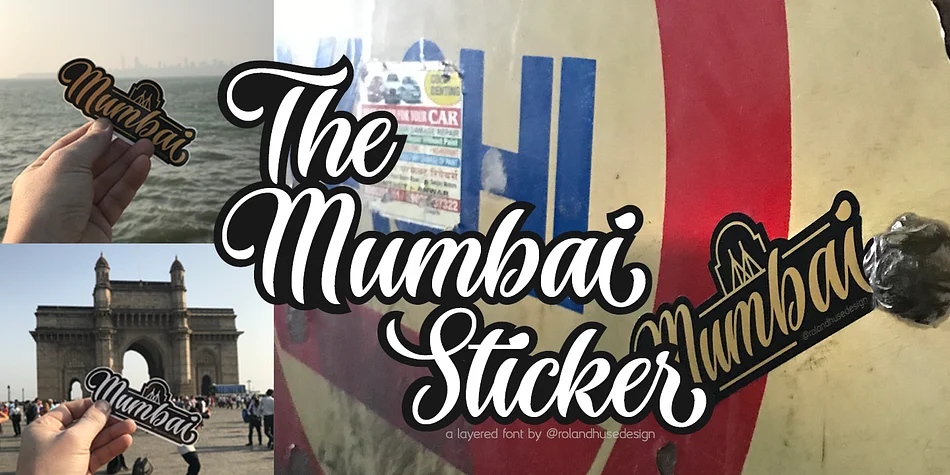
The Mumbai Sticker by Fonts by Roland Hüse is a layered script born from a personal design project: a custom sticker created for a wedding trip to Mumbai. Handcrafted and playful, the font builds visual depth through a clever two-layer system that lets you combine multiple colors and overlapping letterforms for genuine impact.
Wedding invitation suites, vinyl sticker designs, and custom greeting card layouts are where this typeface really shines. You'll find it works beautifully for hand-lettered event signage, personalized Etsy sticker sheets, boutique invitation labels, and scrapbooking embellishments. The script includes built-in standard ligatures that smooth out letter combinations (v with s, r, or z, plus w with s, r, or z), so your connections flow naturally without awkward overlaps or jarring visual breaks.
The magic happens when you layer the two weights together: type your text in Regular, duplicate it in your design software, and switch to the Shadow Outline version in a contrasting color. Black and white deliver the most striking results, though experimenting with other color combinations can yield surprising effects depending on your overall project vision. Get The Mumbai Sticker from Creative Fabrica to start exploring how it transforms your hand-lettered designs into something layered and dimensional.
Style & Use Cases
- Overall Style
- Elegant, Flowing
- Use Case
- Invitations, Branding
- Ideal For
- wedding stationery, greeting cards, and signatures
- Pairs With
- a simple uppercase sans
How to Install The Mumbai Sticker Font
Step-by-step instructions for every platform
- 1Download the The Mumbai Sticker font file (.ttf or .otf).
- 2Locate the downloaded file in your Downloads folder.
- 3Right-click the font file.
- 4Select "Install" to install for the current user, or "Install for all users" to make it available system-wide.
- 5The Mumbai Sticker is now available in Word, Photoshop, Illustrator, and all other apps.
More by Fonts by Roland Hüse
View all →

Browse fonts by theme
Curated collections →Saw a font in a picture? Identify any font from an image with our free Font Finder.
More Script Handwritten Fonts
Browse all →







What pairs well with The Mumbai Sticker Font?
The Mumbai Sticker Font is a script font that shines as a display or heading face. Pair it with a clean sans-serif or serif font for body text — the contrast creates a clear hierarchy while the two styles stay balanced and easy to read.




The Mumbai Sticker Font
Reviewed by the FontBoxDL team · Updated July 2026