 Firefox
About TEMPLATE SHADOW JNL Font
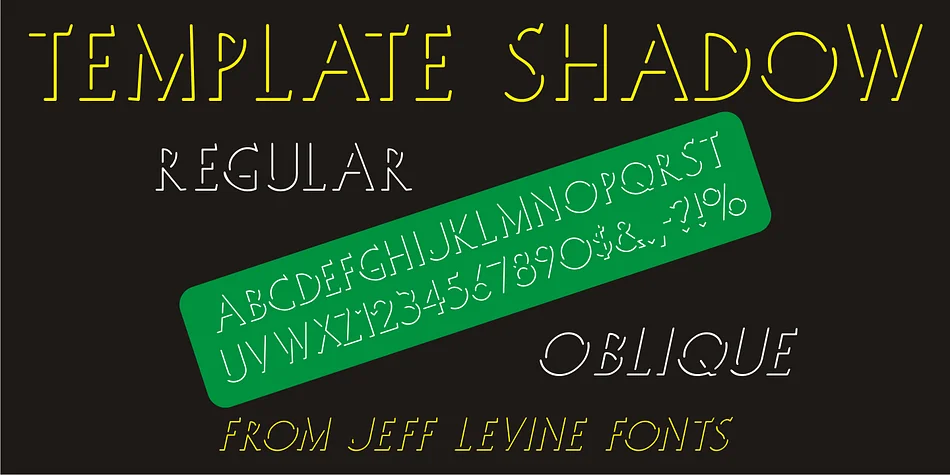
This typeface has the clean, dimensional character of a hand-cut stencil template. Template Shadow JNL, from Jeff Levine Fonts, draws its roots from vintage letterpress templates that graphic designers and print shops once used to hand-produce stencils for offset and mimeograph work.
What makes this design distinctive is its shadow-relief structure, where each letterform gains tactile depth through a secondary outline. The angular, geometric character reflects strong Art Deco DNA: sharp verticals, confident stroke weights, and letterforms that maintain clarity even at modest sizes. It comes in both regular and oblique versions, so you can introduce angle and movement to your layouts whenever the design asks for it. This font excels for vintage-style event announcements, retro product labels for boutique skincare and apothecary brands, geometric logos for architecture and design studios, and art deco revival poster work. The shadow detail becomes more impactful when you scale the type larger, letting the relief work create genuine visual dimension on the page.
Pair it with a straightforward, modern sans-serif for body text to create breathing room and support legibility. Template Shadow JNL is available on Creative Fabrica, ready to anchor designs with nostalgic technical precision.
Style & Use Cases
- Overall Style
- Bold, Distinctive
- Use Case
- Headlines, Posters
- Ideal For
- logos, packaging, and standout titles
- Pairs With
- a neutral sans-serif
How to Install TEMPLATE SHADOW JNL Font
Step-by-step instructions for every platform
- 1Download the TEMPLATE SHADOW JNL font file (.ttf or .otf).
- 2Locate the downloaded file in your Downloads folder.
- 3Right-click the font file.
- 4Select "Install" to install for the current user, or "Install for all users" to make it available system-wide.
- 5TEMPLATE SHADOW JNL is now available in Word, Photoshop, Illustrator, and all other apps.
More by Jeff Levine Fonts
View all →



Browse fonts by theme
Curated collections →Saw a font in a picture? Identify any font from an image with our free Font Finder.
More Decorative Fonts
Browse all →







What pairs well with TEMPLATE SHADOW JNL Font?
TEMPLATE SHADOW JNL Font is a decorative font that shines as a display or heading face. Pair it with a clean sans-serif or serif font for body text — the contrast creates a clear hierarchy while the two styles stay balanced and easy to read.




TEMPLATE SHADOW JNL Font
Reviewed by the FontBoxDL team · Updated June 2026