 Firefox
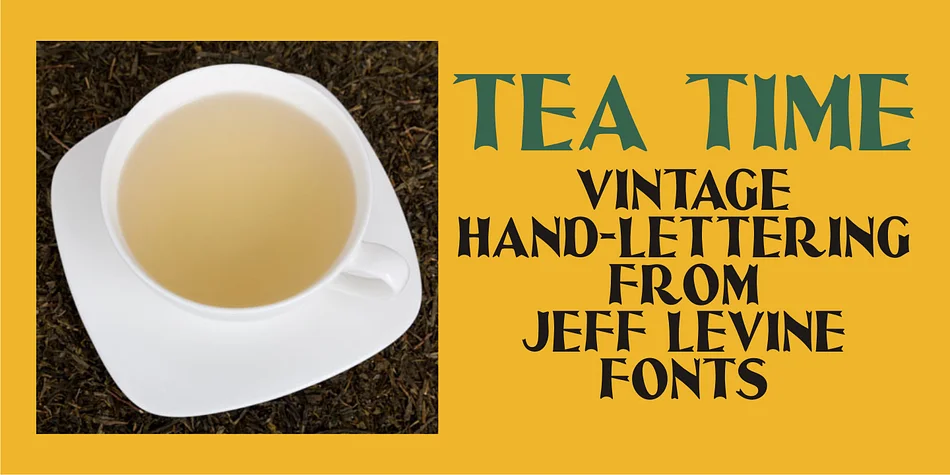
About TEA TIME JNL Font
Picture a vintage wedding invitation on aged cardstock: ornate letterforms that carry the sophisticated elegance of 1920s design. TEA TIME JNL, created by Jeff Levine Fonts, springs directly from the hand lettering on 1931 sheet music for "When I Take My Sugar to Tea." The typeface captures that Art Deco spirit while feeling like an actual heirloom rather than a modern pastiche.
This font excels where period authenticity matters. Designers reach for it when building vintage wedding invitation suites, art deco café menus, antique apothecary labels, and scrapbooking layouts centered on 1930s themes. It works beautifully on specialty product packaging and labels too, bringing genuine retro character without the irony. The letterforms remain clear and readable even at large display sizes, making it ideal for hand-lettered shop signs and decorative posters that need real nostalgic punch without veering into kitsch territory.
Its complete character set supports the range you'd expect from a design rooted in classic hand lettering. When you're designing a project that demands period-specific styling or just want that vintage character, TEA TIME JNL delivers authentic 1930s charm without compromise. Find it on Creative Fabrica and start working with a typeface that actually belongs in that era.
Style & Use Cases
- Overall Style
- Bold, Distinctive
- Use Case
- Headlines, Posters
- Ideal For
- logos, packaging, and standout titles
- Pairs With
- a neutral sans-serif
How to Install TEA TIME JNL Font
Step-by-step instructions for every platform
- 1Download the TEA TIME JNL font file (.ttf or .otf).
- 2Locate the downloaded file in your Downloads folder.
- 3Right-click the font file.
- 4Select "Install" to install for the current user, or "Install for all users" to make it available system-wide.
- 5TEA TIME JNL is now available in Word, Photoshop, Illustrator, and all other apps.
More by Jeff Levine Fonts
View all →



Browse fonts by theme
Curated collections →Saw a font in a picture? Identify any font from an image with our free Font Finder.
More Decorative Fonts
Browse all →







What pairs well with TEA TIME JNL Font?
TEA TIME JNL Font is a decorative font that shines as a display or heading face. Pair it with a clean sans-serif or serif font for body text — the contrast creates a clear hierarchy while the two styles stay balanced and easy to read.




TEA TIME JNL Font
Reviewed by the FontBoxDL team · Updated June 2026