 Firefox
 1 / 10
About TBJ Malibu Font
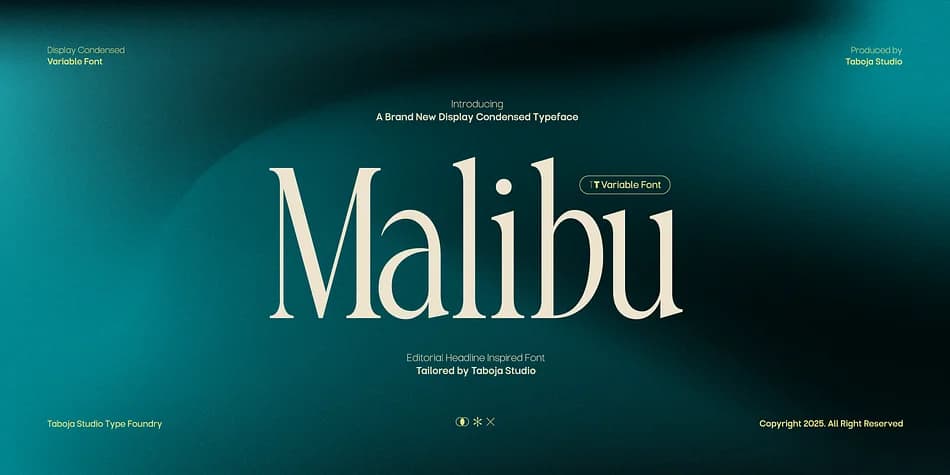
Picture a wedding stationer laying out delicate borders for an invitation. That's where TBJ Malibu by Taboja Studio shines. This condensed display typeface brings real ornamental flair to any design that needs visual texture and character. With eight variable weight and width combinations, you get the kind of flexibility most decorative fonts simply don't offer. You can dial in exactly the proportions your project demands, from subtle accents to bold statements.
The slim, tall proportions work beautifully for decorative borders on invitation suites, ornamental frames in boutique product packaging, and symbol-heavy social media graphics where personality counts. That distinctive green-blue gradient aesthetic gives each glyph depth, which really matters when you're layering elements or building ornamental compositions. The variable system means lighter versions work for delicate passages while bolder weights handle strong visual accents without losing refinement. Each shift in weight or width is calculated, so you're adapting the design rather than just scaling it.
This typeface reads as intentional rather than generic, which makes it genuinely valuable for designers building custom icon systems, event posters, or anywhere ornament serves your layout strategy. The eight variable combinations aren't just marketing; they're practical tools that let you match weight and width to context. Grab it on Creative Fabrica and see what this kind of flexibility can do for your work.
Style & Use Cases
- Overall Style
- Iconographic
- Use Case
- Icons, Accents
- Ideal For
- ornaments, bullets, and decorative flourishes
- Pairs With
- any text font
How to Install TBJ Malibu Font
Step-by-step instructions for every platform
- 1Download the TBJ Malibu font file (.ttf or .otf).
- 2Locate the downloaded file in your Downloads folder.
- 3Right-click the font file.
- 4Select "Install" to install for the current user, or "Install for all users" to make it available system-wide.
- 5TBJ Malibu is now available in Word, Photoshop, Illustrator, and all other apps.
More by Taboja Studio
View all →
Browse fonts by theme
Curated collections →Saw a font in a picture? Identify any font from an image with our free Font Finder.
More Dingbats Fonts
Browse all →







What pairs well with TBJ Malibu Font?
TBJ Malibu Font is a versatile dingbats font that works for both headings and body text. Pair it with a contrasting sans-serif or serif font to add visual interest and a clear distinction between titles and body copy.



TBJ Malibu Font
Reviewed by the FontBoxDL team · Updated September 2026