 Firefox
 1 / 8
1 / 8About Tattoo Elements Font
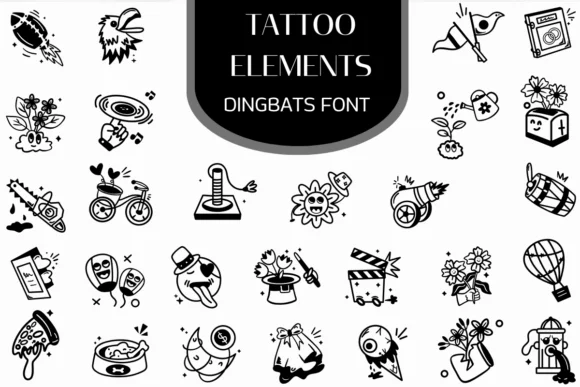
Tattoo Elements by Heartcraft Atelier is a dingbat collection built around hand-drawn tattoo iconography rendered in clean vector outlines. The set delivers a working library of recognizable marks: ornamental mandalas, tribal geometric shapes, floral patterns, stylized animal heads, skulls, and abstract ornamental forms that remain legible at any scale. Because each illustration maps to a keyboard character, you can pull them into designs instantly without hunting through asset libraries or wrestling with imported graphics. This approach keeps your workflow lean, especially when you need fast iteration.
The real utility shows up when you're working on indie band merchandise, designing personalized apparel with custom symbol combinations, or building cohesive pattern sets for boutique tattoo parlor branding and identity work. Social media graphics, product labels for handmade craft goods, and even tattoo sleeve mockups all benefit from having this breadth of thematic marks available as a single font file. The outlined vector style works especially well for coloring book layouts or line art applications if you're exploring interactive or printable versions of your designs. Designers who need ready-made illustration assets without the overhead of sourcing custom artwork will find this streamlines the concept-to-execution phase considerably.
Grab Tattoo Elements on Creative Fabrica and start layering these symbols into your next project.
Style & Use Cases
- Overall Style
- Iconographic, Fonts
- Use Case
- Icons, Accents
- Ideal For
- ornaments, bullets, and decorative flourishes
- Pairs With
- any text font
How to Install Tattoo Elements Font
Step-by-step instructions for every platform
- 1Download the Tattoo Elements font file (.ttf or .otf).
- 2Locate the downloaded file in your Downloads folder.
- 3Right-click the font file.
- 4Select "Install" to install for the current user, or "Install for all users" to make it available system-wide.
- 5Tattoo Elements is now available in Word, Photoshop, Illustrator, and all other apps.
More by Heartcraft Atelier
View all →



Browse fonts by theme
Curated collections →Saw a font in a picture? Identify any font from an image with our free Font Finder.
More Dingbats Fonts
Browse all →







What pairs well with Tattoo Elements Font?
Tattoo Elements Font is a versatile dingbats font that works for both headings and body text. Pair it with a contrasting sans-serif or serif font to add visual interest and a clear distinction between titles and body copy.




Tattoo Elements Font
Reviewed by the FontBoxDL team · Updated June 2026