 Firefox
 1 / 8
1 / 8Loading font…
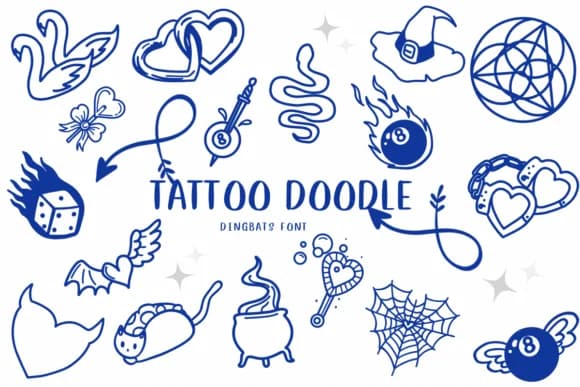
About Tattoo Doodle Font
Picture yourself designing a retro motorcycle brand identity, and you're looking for that hand-drawn symbolic edge. Tattoo Doodle by CHANOK is exactly that. It's a dingbats font built from sketchy line work and ornamental shapes that feel like they walked out of a vintage tattoo studio.
The character set is loaded with the kind of details you actually need: wave patterns, flower clusters, checkered flags, hearts, and cross elements all rendered in raw, unpolished strokes. You'll find it working well for biker gang logos, motorcycle club merchandise, vintage skateboard graphics, Halloween party invitations, festival posters, and retro band t-shirt designs. The hand-drawn texture stays readable at scale because every glyph has enough weight and definition without losing that sketchy, analog feeling.
What makes it valuable in the toolbox is pure versatility. It works wonderfully for tattoo flash collections, vintage merchandise packaging, lifestyle apparel graphics, and any project where hand-drawn ornament beats precision. The doodles maintain their character and don't feel forced when scaled or repositioned. Pair it with a strong serif or clean sans-serif and let the ornamental elements carry the visual interest. Grab it from Creative Fabrica and start layering in those details.
Style & Use Cases
- Overall Style
- Iconographic, Tattoo
- Use Case
- Icons, Accents
- Ideal For
- ornaments, bullets, and decorative flourishes
- Pairs With
- any text font
How to Install Tattoo Doodle Font
Step-by-step instructions for every platform
- 1Download the Tattoo Doodle font file (.ttf or .otf).
- 2Locate the downloaded file in your Downloads folder.
- 3Right-click the font file.
- 4Select "Install" to install for the current user, or "Install for all users" to make it available system-wide.
- 5Tattoo Doodle is now available in Word, Photoshop, Illustrator, and all other apps.
More by CHANOK
View all →

Browse fonts by theme
Curated collections →Saw a font in a picture? Identify any font from an image with our free Font Finder.
More Dingbats Fonts
Browse all →







What pairs well with Tattoo Doodle Font?
Tattoo Doodle Font is a versatile dingbats font that works for both headings and body text. Pair it with a contrasting sans-serif or serif font to add visual interest and a clear distinction between titles and body copy.



Tattoo Doodle Font
by CHANOK
Reviewed by the FontBoxDL team · Updated October 2026