 Firefox
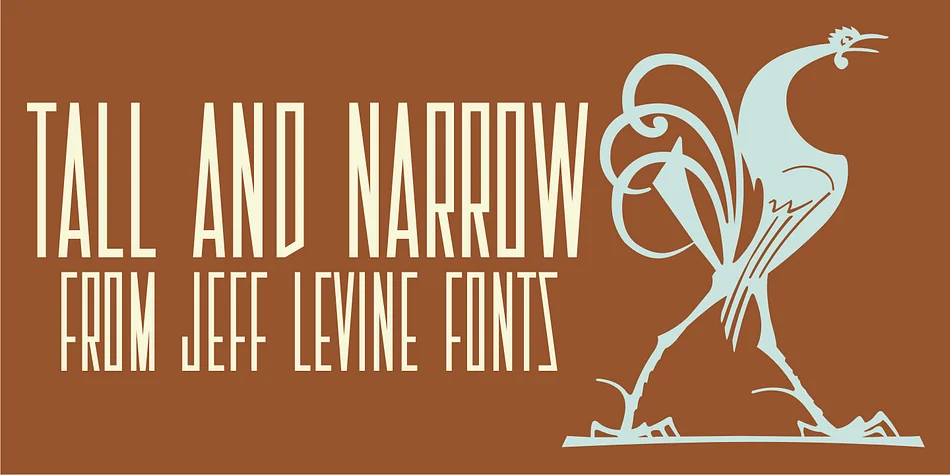
About TALL AND NARROW JNL Font
This typeface carries the bold, nostalgic energy of 1920s theater design. TALL AND NARROW JNL, designed by Jeff Levine Fonts, draws from hand lettering that appeared on vintage sheet music of the era.
The font translates those narrow, squared-off block letters into a refined digital typeface with real character. Instead of just another generic condensed face, it brings personality rooted in a specific moment in design history. The creation process involved thoughtful refinements that preserve the theatrical quality of the source material while making it genuinely usable as a display typeface. This balance between historical authenticity and practical function is what sets it apart from the countless decorative condensed typefaces already available.
The narrow proportions make it ideal for retro-inspired jazz club signage, vintage speakeasy posters, art deco wedding announcements, and nostalgic music merchandise packaging. Deploy it as a headline or focal point where its strong character commands attention. Pair it with a clean, minimalist geometric sans-serif for supporting text, which provides visual breathing room and lets the distinctive letterforms take their rightful place. You'll find this font on Creative Fabrica, ready to inject some authentic 1920s spirit into your next project.
Style & Use Cases
- Overall Style
- Bold, Distinctive
- Use Case
- Headlines, Posters
- Ideal For
- logos, packaging, and standout titles
- Pairs With
- a neutral sans-serif
How to Install TALL AND NARROW JNL Font
Step-by-step instructions for every platform
- 1Download the TALL AND NARROW JNL font file (.ttf or .otf).
- 2Locate the downloaded file in your Downloads folder.
- 3Right-click the font file.
- 4Select "Install" to install for the current user, or "Install for all users" to make it available system-wide.
- 5TALL AND NARROW JNL is now available in Word, Photoshop, Illustrator, and all other apps.
More by Jeff Levine Fonts
View all →



Browse fonts by theme
Curated collections →Saw a font in a picture? Identify any font from an image with our free Font Finder.
More Decorative Fonts
Browse all →







What pairs well with TALL AND NARROW JNL Font?
TALL AND NARROW JNL Font is a decorative font that shines as a display or heading face. Pair it with a clean sans-serif or serif font for body text — the contrast creates a clear hierarchy while the two styles stay balanced and easy to read.




TALL AND NARROW JNL Font
Reviewed by the FontBoxDL team · Updated June 2026