 Firefox
 1 / 8
1 / 8Loading font…
About Swirls Line Font
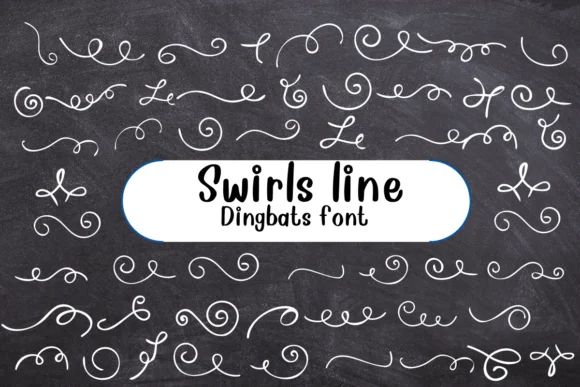
Imagine laying out an invitation for a couples' shower and reaching for something that feels handmade and friendly rather than stiff. Swirls Line, created by Nongyao, is a dingbat font packed with cheerful line-drawn elements that work exactly like that. Instead of hunting for scattered decorative assets, you get organized rows of swirls, arrows, circles, and cartoon doodle marks all in one font file.
The real payoff comes when you're working on projects that need personality without fussiness. Wedding invitation suites, thank-you cards, and place card sets benefit from these outline dividers and connectors. From Etsy product labels to boutique packaging, these playful doodles add warmth where it's needed. Scrapbooking layouts and DIY greeting cards come alive when you layer these symbols with your main text, and the outline keeps everything clean and readable whether printed small or enlarged for posters.
Available in both OTF and TTF formats, Swirls Line integrates smoothly into Procreate, Affinity Designer, Affinity Photo, and other professional tools you're likely using. These elements sit nicely on top of other designs without overwhelming them because of the outline construction. Get it from Creative Fabrica and start solving design problems with these friendly marks.
Style & Use Cases
- Overall Style
- Iconographic, Fonts
- Use Case
- Icons, Accents
- Ideal For
- ornaments, bullets, and decorative flourishes
- Pairs With
- any text font
How to Install Swirls Line Font
Step-by-step instructions for every platform
- 1Download the Swirls Line font file (.ttf or .otf).
- 2Locate the downloaded file in your Downloads folder.
- 3Right-click the font file.
- 4Select "Install" to install for the current user, or "Install for all users" to make it available system-wide.
- 5Swirls Line is now available in Word, Photoshop, Illustrator, and all other apps.




Browse fonts by theme
Curated collections →Saw a font in a picture? Identify any font from an image with our free Font Finder.
More Dingbats Fonts
Browse all →







What pairs well with Swirls Line Font?
Swirls Line Font is a versatile dingbats font that works for both headings and body text. Pair it with a contrasting sans-serif or serif font to add visual interest and a clear distinction between titles and body copy.




Swirls Line Font
by Nongyao
Reviewed by the FontBoxDL team · Updated October 2026