 Firefox
 1 / 8
1 / 8About Swirl Clipart Font
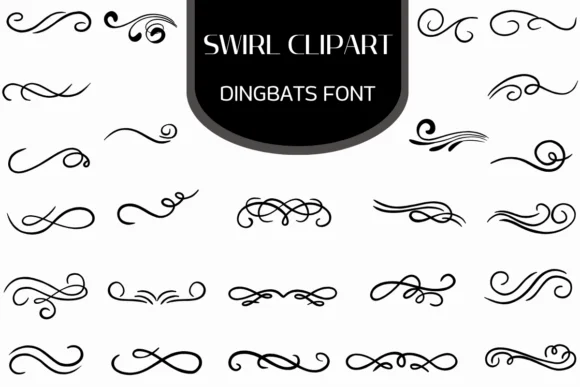
Swirl Clipart is a dingbat font from Heartcraft Atelier built entirely from hand-drawn ornamental flourishes and decorative swirl elements rather than traditional letters. Because each glyph is a vector-based graphic, you can scale it infinitely without any quality loss, making it a reliable choice for detailed design work at any size.
This collection shines when you need decorative accents and borders that feel refined and intentional. Wedding invitation suites benefit from ornate corner flourishes and frame elements, while Etsy product packaging gets instant visual appeal from layered swirl backgrounds and dividers. Menu cards look particularly polished with these graphic elements creating sophisticated section breaks, and printable wall art gains texture through swirling corner accents. The vector designs give you plenty of options for highlighting focal points or bridging sections without feeling flat or generic.
Graphic designers, lettering artists, and craft enthusiasts reach for dingbat fonts like this one whenever they need to add visual detail and sophistication quickly. Rather than hand-drawing ornaments, you simply select the glyph that matches the accent you want, and it scales beautifully at any size. The font works across major design software and is available on Creative Fabrica, where you can download it and start using these decorative assets in your projects right away.
Style & Use Cases
- Overall Style
- Iconographic, Fonts
- Use Case
- Icons, Accents
- Ideal For
- ornaments, bullets, and decorative flourishes
- Pairs With
- any text font
How to Install Swirl Clipart Font
Step-by-step instructions for every platform
- 1Download the Swirl Clipart font file (.ttf or .otf).
- 2Locate the downloaded file in your Downloads folder.
- 3Right-click the font file.
- 4Select "Install" to install for the current user, or "Install for all users" to make it available system-wide.
- 5Swirl Clipart is now available in Word, Photoshop, Illustrator, and all other apps.
More by Heartcraft Atelier
View all →



Browse fonts by theme
Curated collections →Saw a font in a picture? Identify any font from an image with our free Font Finder.
More Dingbats Fonts
Browse all →







What pairs well with Swirl Clipart Font?
Swirl Clipart Font is a versatile dingbats font that works for both headings and body text. Pair it with a contrasting sans-serif or serif font to add visual interest and a clear distinction between titles and body copy.




Swirl Clipart Font
Reviewed by the FontBoxDL team · Updated June 2026