 Firefox
 1 / 8
1 / 8About Sweets Mithai Font
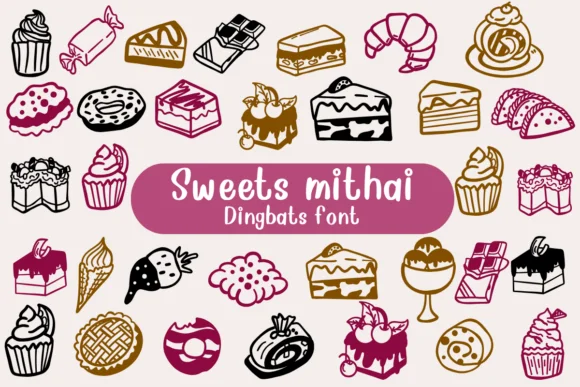
Picture yourself designing labels for homemade cookie packaging or planning the visual identity for a bakery pop-up. Sweets Mithai, a dingbats font by Nongyao, is built entirely from decorative symbols that capture the language of celebration and sweetness. Rather than letters, you get candies, flowers, candles, platters, treats, and festive imagery that lets you compose layouts with pure visual storytelling.
Where does this shine most? DIY dessert labels for homemade goods benefit from the consistent, warm aesthetic. Wedding favor tags come alive when you scatter these icons between guest names. Festival decoration designs and traditional celebration graphics gain immediate personality. Etsy shop owners use these to create visual rhythm on product cards and packaging mockups without cluttering the frame with text. Each symbol reads cleanly at any scale, from small accent tags up to large header elements in poster designs.
What matters most is restraint. Symbols feel purposeful and cohesive rather than chaotic, avoiding the overly fussy look that sabotages many decoration fonts. Layer them, scatter them, or use them as a single focal point. You'll find the consistent line weight and proportions keep everything unified, no matter how you arrange them. Grab it on Creative Fabrica to bring this decorative language into your next project.
Style & Use Cases
- Overall Style
- Iconographic, Diy
- Use Case
- Icons, Accents
- Ideal For
- ornaments, bullets, and decorative flourishes
- Pairs With
- any text font
How to Install Sweets Mithai Font
Step-by-step instructions for every platform
- 1Download the Sweets Mithai font file (.ttf or .otf).
- 2Locate the downloaded file in your Downloads folder.
- 3Right-click the font file.
- 4Select "Install" to install for the current user, or "Install for all users" to make it available system-wide.
- 5Sweets Mithai is now available in Word, Photoshop, Illustrator, and all other apps.




Browse fonts by theme
Curated collections →Saw a font in a picture? Identify any font from an image with our free Font Finder.
More Dingbats Fonts
Browse all →







What pairs well with Sweets Mithai Font?
Sweets Mithai Font is a versatile dingbats font that works for both headings and body text. Pair it with a contrasting sans-serif or serif font to add visual interest and a clear distinction between titles and body copy.




Sweets Mithai Font
by Nongyao
Reviewed by the FontBoxDL team · Updated June 2026