
 1 / 8
1 / 8About Sweet Petunia Font
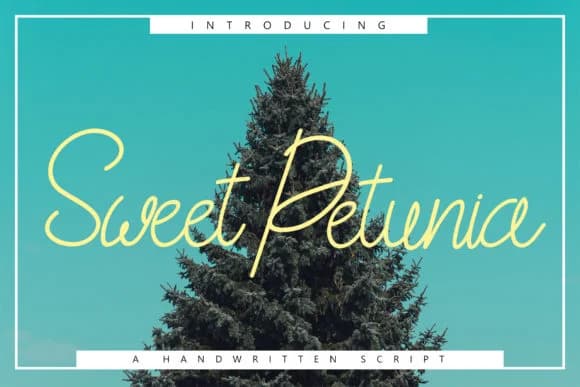
Sweet Petunia Font by Rustype is a handcrafted script defined by delicate, thin letterforms that blend casual warmth with understated elegance. The font captures a contemporary hand-lettered aesthetic while maintaining impressive legibility across both digital and print applications. The refined letterwork makes this typeface particularly valuable for creating sophisticated branding assets. It excels in wedding invitation suites where its airy strokes suggest romance without sacrificing readability. Designers also find it ideal for boutique product packaging, especially cosmetics labels and artisan skincare branding where subtle sophistication communicates quality. Blog and website headers benefit from its organic personality, while its distinctive character set works wonderfully for custom apparel graphics and clothing label design where hand-drawn charm enhances brand storytelling. Beyond traditional typography applications, Sweet Petunia shines in typographic illustration and decorative graphic work. The thin letterforms create visual interest without overwhelming layouts, making it suitable for lifestyle brand social media content, minimalist poster designs, and indie business identity systems. Its well-balanced letterwork translates consistently across various sizes, giving designers confidence when using it for everything from headline copy to featured text elements. Get Sweet Petunia Font and bring handcrafted sophistication to your designs on Creative Fabrica.
How to Install Sweet Petunia Font Font
Step-by-step instructions for every platform
- 1Download the Sweet Petunia Font font file (.ttf or .otf).
- 2Locate the downloaded file in your Downloads folder.
- 3Right-click the font file.
- 4Select "Install" to install for the current user, or "Install for all users" to make it available system-wide.
- 5Sweet Petunia Font is now available in Word, Photoshop, Illustrator, and all other apps.
More by Rustype
View all →
More Script Handwritten Fonts
Browse all →







What pairs well with Sweet Petunia Font?
Sweet Petunia Font is a script font that shines as a display or heading face. Pair it with a clean sans-serif or serif font for body text — the contrast creates a clear hierarchy while the two styles stay balanced and easy to read.


Sweet Petunia Font
by Rustype
Reviewed by the FontBoxDL team · Updated May 2026