 Firefox
 1 / 5
1 / 5About STYLIZED DECO JNL Font
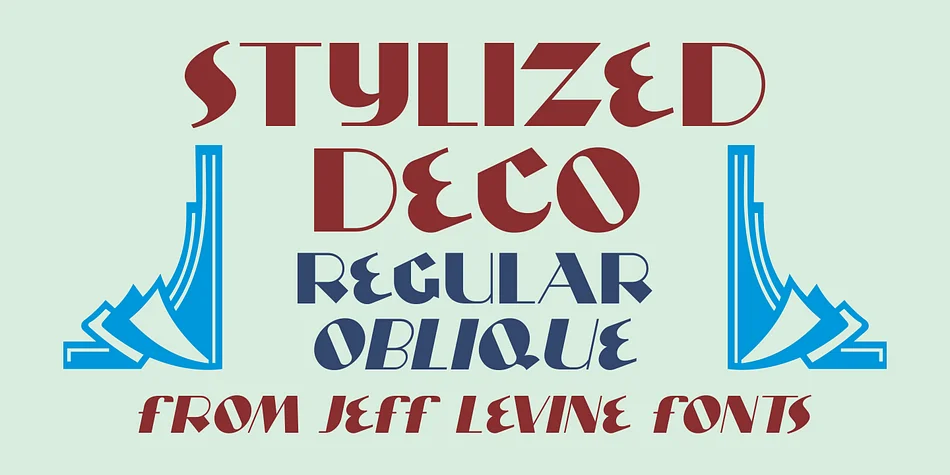
Imagine you're designing a luxury candle label or art deco inspired event invitation and you need lettering with real character. Stylized Deco JNL, designed by Jeff Levine Fonts, takes inspiration from a classic Art Deco alphabet and brings it into the digital age with impressive versatility. The typeface plays with thick and thin strokes throughout, mixing geometric sensibility with calligraphic flourishes that feel both refined and slightly theatrical.
This font shines for high-end packaging projects, vintage-style branding suites, and retro restaurant menus where a touch of glamour matters. It works equally well on ornate invitations, speakeasy-themed designs, and art deco posters that need immediate visual impact. The interplay between the weighted letterforms gives compositions a sense of movement and sophistication that simpler typefaces can't match. Use it where you want to signal luxury or nostalgia without being heavy-handed about either.
Both regular and oblique versions ship with the font, giving you flexibility for headlines, display work, and decorative layouts. At large sizes the character shines especially bright, making it ideal for covers and prominent design elements. Grab it from Creative Fabrica and start bringing that art deco glamour to your next project.
Style & Use Cases
- Overall Style
- Bold, Distinctive
- Use Case
- Headlines, Posters
- Ideal For
- logos, packaging, and standout titles
- Pairs With
- a neutral sans-serif
How to Install STYLIZED DECO JNL Font
Step-by-step instructions for every platform
- 1Download the STYLIZED DECO JNL font file (.ttf or .otf).
- 2Locate the downloaded file in your Downloads folder.
- 3Right-click the font file.
- 4Select "Install" to install for the current user, or "Install for all users" to make it available system-wide.
- 5STYLIZED DECO JNL is now available in Word, Photoshop, Illustrator, and all other apps.
More by Jeff Levine Fonts
View all →



Browse fonts by theme
Curated collections →Saw a font in a picture? Identify any font from an image with our free Font Finder.
More Decorative Fonts
Browse all →







What pairs well with STYLIZED DECO JNL Font?
STYLIZED DECO JNL Font is a decorative font that shines as a display or heading face. Pair it with a clean sans-serif or serif font for body text — the contrast creates a clear hierarchy while the two styles stay balanced and easy to read.




STYLIZED DECO JNL Font
Reviewed by the FontBoxDL team · Updated June 2026