 Firefox
 1 / 2
1 / 2About Stock Font
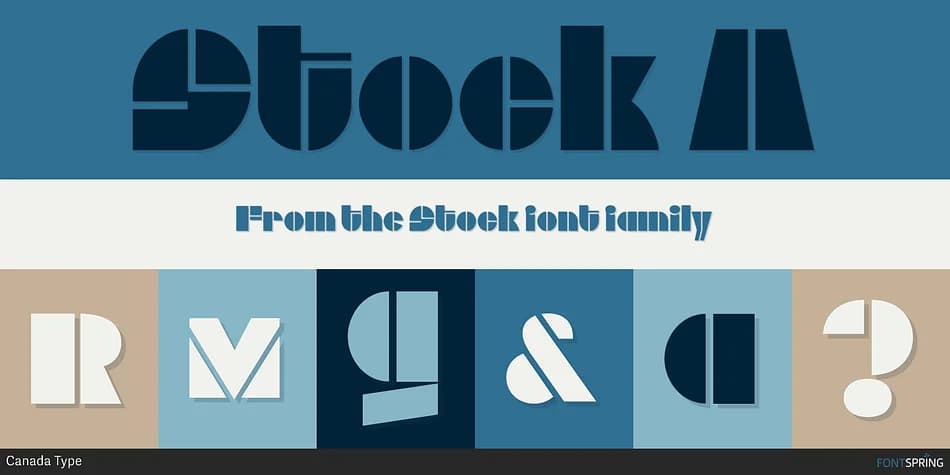
Stock by Canada Type is a chunky, stencil-inspired decorative font built for maximum visual impact. It's the kind of typeface that commands attention without trying to be refined, which makes it ideal for graffiti-style posters, graphic t-shirt design, comic book lettering, and retro diner signage. The letterforms are deliberately thick and playful, almost cartoonish in their execution, giving projects an energetic and unapologetic character that stands out in any visual context.
This font works best when you need something that reads like street culture or contemporary illustration done with bold strokes. Novelty toy packaging, skateboard graphics, album artwork for edgy music releases, and comic store signage all come alive with Stock's distinctive stencil aesthetic. The construction means each character stands on its own visually, so it maintains legibility at nearly any size and even holds up when you push color choices in experimental directions. Its weight and presence make it especially strong for headlines and display work where you want attitude to matter.
If you're hunting for a typeface that brings irreverent energy to your work without pretense, Stock delivers. Grab it from Creative Fabrica and watch how it transforms your boldest design projects into something genuinely memorable.
Style & Use Cases
- Overall Style
- Bold, Distinctive
- Use Case
- Headlines, Posters
- Ideal For
- logos, packaging, and standout titles
- Pairs With
- a neutral sans-serif
How to Install Stock Font
Step-by-step instructions for every platform
- 1Download the Stock font file (.ttf or .otf).
- 2Locate the downloaded file in your Downloads folder.
- 3Right-click the font file.
- 4Select "Install" to install for the current user, or "Install for all users" to make it available system-wide.
- 5Stock is now available in Word, Photoshop, Illustrator, and all other apps.
More by Canada Type
View all →



Browse fonts by theme
Curated collections →Saw a font in a picture? Identify any font from an image with our free Font Finder.
More Decorative Fonts
Browse all →







What pairs well with Stock Font?
Stock Font is a decorative font that shines as a display or heading face. Pair it with a clean sans-serif or serif font for body text — the contrast creates a clear hierarchy while the two styles stay balanced and easy to read.



Stock Font
by Canada Type
Reviewed by the FontBoxDL team · Updated June 2026