
 1 / 8
1 / 8About Stickers Font
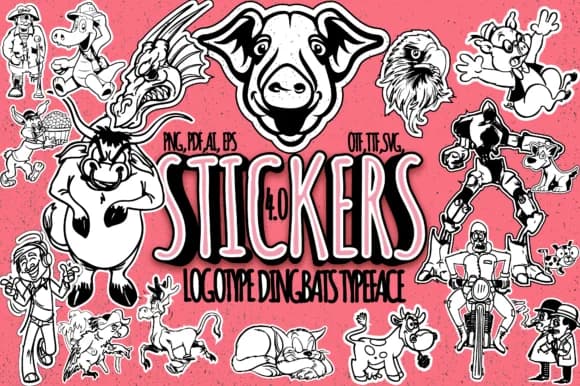
Stickers by Minimalistartstudio is a character-based dingbat font that transforms typing into instant illustration. This typeface generates 62 charming cartoon doodles, each triggered by a different keystroke, covering everything from animals to playful geometric shapes. The concept is straightforward: type letters and numbers, and out comes finished artwork. No drawing required, no hunting through clipart collections.
Practical applications stack up quickly once you start using it. Designers turn to Stickers for building sticker sheet templates and laser-cut designs, where consistency and speed matter. Coloring book layouts benefit especially since you can generate dozens of character variations just by typing different keys. Comic and cartoon work feels right at home with the vintage charm baked into these marks. Scrapbooking pages, DIY craft labels, and small product packaging all gain visual interest when you swap static text for these playful doodles.
The SVG-compatible format gives you flexibility: export the characters, scale them to any size, embed them into larger compositions, or use them as-is in your designs. For anyone working with digital craft tools or Silhouette-style cutters, the vector output means clean cuts and sharp results every time. If you want a font that produces finished visual content instead of just displaying text, Stickers delivers the goods. Head to Creative Fabrica to add it to your library.
Style & Use Cases
- Overall Style
- Iconographic, Stickers
- Use Case
- Icons, Accents
- Ideal For
- ornaments, bullets, and decorative flourishes
- Pairs With
- any text font
How to Install Stickers Font
Step-by-step instructions for every platform
- 1Download the Stickers font file (.ttf or .otf).
- 2Locate the downloaded file in your Downloads folder.
- 3Right-click the font file.
- 4Select "Install" to install for the current user, or "Install for all users" to make it available system-wide.
- 5Stickers is now available in Word, Photoshop, Illustrator, and all other apps.
More by Minimalistartstudio
View all →



Browse fonts by theme
Curated collections →Saw a font in a picture? Identify any font from an image with our free Font Finder.
More Dingbats Fonts
Browse all →







What pairs well with Stickers Font?
Stickers Font is a versatile dingbats font that works for both headings and body text. Pair it with a contrasting sans-serif or serif font to add visual interest and a clear distinction between titles and body copy.



Stickers Font
Reviewed by the FontBoxDL team · Updated July 2026