 Firefox
 1 / 8
1 / 8About Sticker Speech Font
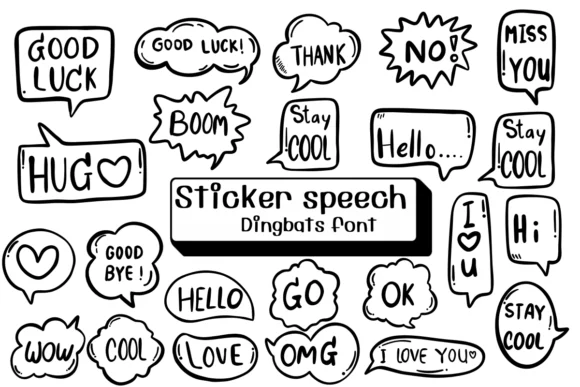
These hand-drawn speech bubbles packed with simple words capture a casual doodle quality that feels approachable and genuinely warm. Designer Ketsarin created Sticker Speech as a dingbat collection that transforms these typographic elements into a genuine design tool you can actually use. The letterforms read as authentically sketched rather than digital, which is exactly what makes them work in playful contexts.
These speech bubble glyphs function as design components in their own right. Illustrators use them to build comic strip lettering quickly and naturally, designers mock up chat app interfaces with genuine personality, and makers create social media sticker sets that feel conversational rather than generic. The font works equally well in DIY comic books, greeting card layouts, and podcast cover art where dialogue needs to feel spontaneous and alive. Available in both OTF and TTF formats, Sticker Speech works with Procreate, Affinity Designer, and other creative tools in your toolkit.
This font is built for designers and illustrators who work on dialogue-heavy projects needing real character and voice. If your designs need personality baked right into the type, grab Sticker Speech from Creative Fabrica and add depth to your next creative piece.
Style & Use Cases
- Overall Style
- Iconographic, Fonts
- Use Case
- Icons, Accents
- Ideal For
- ornaments, bullets, and decorative flourishes
- Pairs With
- any text font
How to Install Sticker Speech Font
Step-by-step instructions for every platform
- 1Download the Sticker Speech font file (.ttf or .otf).
- 2Locate the downloaded file in your Downloads folder.
- 3Right-click the font file.
- 4Select "Install" to install for the current user, or "Install for all users" to make it available system-wide.
- 5Sticker Speech is now available in Word, Photoshop, Illustrator, and all other apps.
More by Ketsarin
View all →
Browse fonts by theme
Curated collections →Saw a font in a picture? Identify any font from an image with our free Font Finder.
More Dingbats Fonts
Browse all →







What pairs well with Sticker Speech Font?
Sticker Speech Font is a versatile dingbats font that works for both headings and body text. Pair it with a contrasting sans-serif or serif font to add visual interest and a clear distinction between titles and body copy.




Sticker Speech Font
by Ketsarin
Reviewed by the FontBoxDL team · Updated July 2026