 Firefox
 1 / 8
1 / 8About Sticker Notes Font
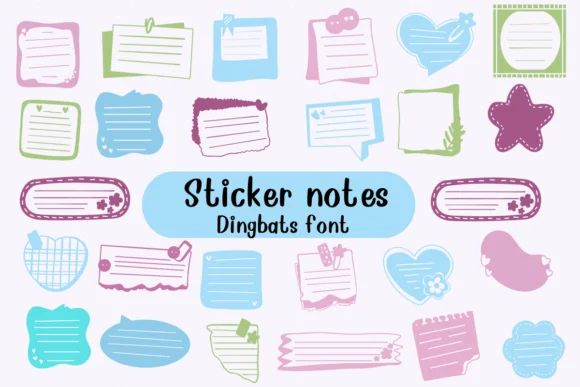
This dingbat captures the warmth and personality of handwritten sticky notes pinned casually across a workspace. Sticker Notes by Nongyao is a collection where each character transforms into a different colored note shape, drawn in that casual, doodle-style aesthetic that feels equally at home in digital layouts and physical print applications alike.
The typeface excels in bullet journal spreads, greeting card designs, and scrapbooking projects where you need genuine visual texture without heavy formality getting in the way. It works equally well creating digital sticker packs for planning applications, adding quirky note elements to boutique product packaging, or designing vintage craft labels that genuinely need personality and warmth. With multiple color variations built into the character set, you gain real visual richness without hunting for secondary fonts, and the straightforward geometric shapes stay legible even when scaled small or displayed across different backgrounds and media types.
When combining with body text, pair Sticker Notes with a clean sans-serif like Inter or Montserrat to maintain readability. That contrast keeps your layouts balanced and ensures the sticky notes remain the focal point without competing visual elements. Find it on Creative Fabrica and bring that authentic handmade, paper-craft feeling into your next design project.
Style & Use Cases
- Overall Style
- Iconographic, Fonts
- Use Case
- Icons, Accents
- Ideal For
- ornaments, bullets, and decorative flourishes
- Pairs With
- any text font
How to Install Sticker Notes Font
Step-by-step instructions for every platform
- 1Download the Sticker Notes font file (.ttf or .otf).
- 2Locate the downloaded file in your Downloads folder.
- 3Right-click the font file.
- 4Select "Install" to install for the current user, or "Install for all users" to make it available system-wide.
- 5Sticker Notes is now available in Word, Photoshop, Illustrator, and all other apps.

Browse fonts by theme
Curated collections →Saw a font in a picture? Identify any font from an image with our free Font Finder.
More Dingbats Fonts
Browse all →






What pairs well with Sticker Notes Font?
Sticker Notes Font is a versatile dingbats font that works for both headings and body text. Pair it with a contrasting sans-serif or serif font to add visual interest and a clear distinction between titles and body copy.




Sticker Notes Font
by Nongyao
Reviewed by the FontBoxDL team · Updated June 2026