 Firefox
 1 / 8
1 / 8Loading font…
About Star Dividers Font
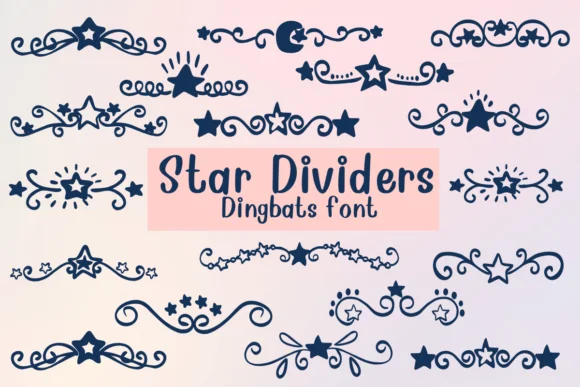
Picture yourself designing wedding invitation suites and needing dividers that go beyond standard lines. Star Dividers, created by Nongyao, is a dingbat collection built entirely from star-shaped symbols and decorative marks that replace those bland separators with genuine visual interest. Each star has its own personality, from simple outlines to more intricate doodle designs, giving you options that actually match the tone of your work.
This font shines in situations where you need playful borders and accents. Wedding stationery is obvious, but you'll also find it indispensable for custom scrapbook pages, greeting card designs, and DIY craft labels where a touch of whimsy works better than serious typography. The outline style of the glyphs means you can easily color them to coordinate with your palette, and layer them for added depth. You get enough star variations that each project can feel fresh.
The best part is versatility. Whether you're using a single star as a small accent or building a full line of them as a major design element, they render cleanly across sizes. The font works equally well as a delicate touch in minimalist designs or a bold statement in more decorative layouts. Grab Star Dividers from Creative Fabrica to add a constellation of options to your design toolkit.
Style & Use Cases
- Overall Style
- Iconographic, Fonts
- Use Case
- Icons, Accents
- Ideal For
- ornaments, bullets, and decorative flourishes
- Pairs With
- any text font
How to Install Star Dividers Font
Step-by-step instructions for every platform
- 1Download the Star Dividers font file (.ttf or .otf).
- 2Locate the downloaded file in your Downloads folder.
- 3Right-click the font file.
- 4Select "Install" to install for the current user, or "Install for all users" to make it available system-wide.
- 5Star Dividers is now available in Word, Photoshop, Illustrator, and all other apps.




Browse fonts by theme
Curated collections →Saw a font in a picture? Identify any font from an image with our free Font Finder.
More Dingbats Fonts
Browse all →







What pairs well with Star Dividers Font?
Star Dividers Font is a versatile dingbats font that works for both headings and body text. Pair it with a contrasting sans-serif or serif font to add visual interest and a clear distinction between titles and body copy.




Star Dividers Font
by Nongyao
Reviewed by the FontBoxDL team · Updated October 2026