 Firefox
 1 / 8
1 / 8About Spooky Earring Font
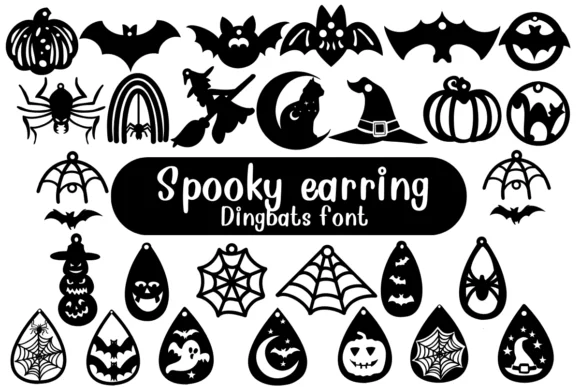
Spooky Earring, designed by Nongyao, is a dingbat font composed entirely of symbols and ornamental icons rather than traditional letterforms. The glyphs embrace a deliberately loose, hand-drawn sensibility with linework that forgoes precision in favor of sketchy charm, paired with a watercolor-like texture that makes each icon feel authentically handmade and imperfect.
What makes this collection particularly valuable is how it balances whimsy with genuine spookiness throughout. You'll find it truly useful for Halloween party invitations where sophisticated taste matters far more than saccharine cuteness, custom sticker designs for witchy planners and bullet journal spreads, social media graphics for small horror illustrators or indie beauty brands building dark brand aesthetics, and tattoo flash art references for anyone exploring spooky imagery. The outline treatment also excels for coloring projects you want to customize yourself, or print-and-cut sticker designs that need crisp, precise lines.
Both OTF and TTF formats arrive in the package, so it plays nicely with Adobe Creative Suite, Affinity Designer, Affinity Photo, and Procreate for iPad workflows. If you're building designs in seasonal, alternative, or illustrative spaces, this fills a genuine gap that generalist dingbat fonts leave wide open. Pick up Spooky Earring from Creative Fabrica whenever you need ornaments that actually have personality and edge.
Style & Use Cases
- Overall Style
- Iconographic, Fonts
- Use Case
- Icons, Accents
- Ideal For
- ornaments, bullets, and decorative flourishes
- Pairs With
- any text font
How to Install Spooky Earring Font
Step-by-step instructions for every platform
- 1Download the Spooky Earring font file (.ttf or .otf).
- 2Locate the downloaded file in your Downloads folder.
- 3Right-click the font file.
- 4Select "Install" to install for the current user, or "Install for all users" to make it available system-wide.
- 5Spooky Earring is now available in Word, Photoshop, Illustrator, and all other apps.

Browse fonts by theme
Curated collections →Saw a font in a picture? Identify any font from an image with our free Font Finder.
More Dingbats Fonts
Browse all →






What pairs well with Spooky Earring Font?
Spooky Earring Font is a versatile dingbats font that works for both headings and body text. Pair it with a contrasting sans-serif or serif font to add visual interest and a clear distinction between titles and body copy.




Spooky Earring Font
by Nongyao
Reviewed by the FontBoxDL team · Updated July 2026