 Firefox
 1 / 8
1 / 8About Spooky Dingbats Font
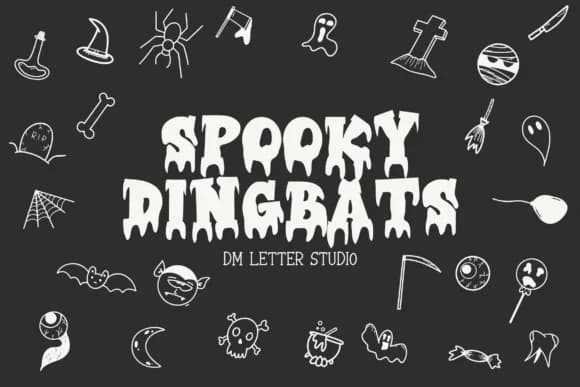
Spooky Dingbats, designed by Sharon of DmStudio, is a Halloween-themed icon set that functions as a working font. Just type to pull up whichever symbol you need from the collection. This set holds over 40 icons spanning ghosts, bats, pumpkins, skulls, and other seasonal imagery. Each is rendered as a clean vector shape with crisp, defined outlines, so they stay clear whether you're working on screen or readying files for print.
The real value is flexibility across your workflow. Use this to create Halloween party invitations that stand out, design spooky window signage for seasonal retail displays, develop product labels for boutique candy makers, or build graphics for greeting card collections. Since these are vector-based shapes, you can scale infinitely without losing definition. The font integrates smoothly into Illustrator, Photoshop, Procreate, and other standard design tools, and it ships in both OTF and TTF formats to work with whatever software you're using.
Designers and craft makers building seasonal collateral will find the most value here. If you're decorating invitations, packaging, or event materials with Halloween themes, having this collection on hand saves time and gives you a cohesive visual language across all your pieces. Grab Spooky Dingbats on Creative Fabrica.
Style & Use Cases
- Overall Style
- Iconographic, Spooky Dingbat Font
- Use Case
- Icons, Accents
- Ideal For
- ornaments, bullets, and decorative flourishes
- Pairs With
- any text font
How to Install Spooky Dingbats Font
Step-by-step instructions for every platform
- 1Download the Spooky Dingbats font file (.ttf or .otf).
- 2Locate the downloaded file in your Downloads folder.
- 3Right-click the font file.
- 4Select "Install" to install for the current user, or "Install for all users" to make it available system-wide.
- 5Spooky Dingbats is now available in Word, Photoshop, Illustrator, and all other apps.
More by Sharon ( DmStudio )
View all →
Browse fonts by theme
Curated collections →Saw a font in a picture? Identify any font from an image with our free Font Finder.
More Dingbats Fonts
Browse all →







What pairs well with Spooky Dingbats Font?
Spooky Dingbats Font is a versatile dingbats font that works for both headings and body text. Pair it with a contrasting sans-serif or serif font to add visual interest and a clear distinction between titles and body copy.



Spooky Dingbats Font
Reviewed by the FontBoxDL team · Updated June 2026