 Firefox
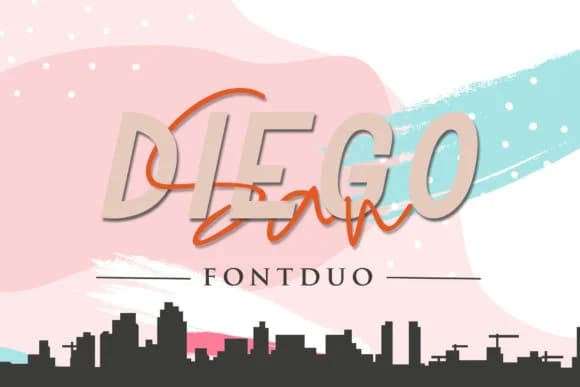 1 / 9
1 / 9About San Diego Duo Font
San Diego Duo by Sharon (DmStudio) pairs a clean sans serif with a flowing signature script, creating a dual-font system designed to do real work across a project. The sans serif carries the structural backbone: headers, navigation, body copy, fine print. Its script companion brings genuine handwritten warmth and energy without competing for attention or sacrificing readability when you need it most.
This pairing opens unexpected doors for designers working on projects where authenticity matters. Wedding invitation suites gain immediate personality when the script leads the way, anchored by the sans serif for practical details and RSVP information. Etsy product labels benefit from the same visual balance: the script signals craft and care, while the sans serif builds consumer trust through crystal-clear legibility. Indie brand social media pulls the same strength, letting you run the script loose and expressive on Instagram Stories while keeping it measured on product packaging for boutique skincare lines and artisan goods. The serif options provide additional weight and texture, letting you shift mood from elegant to editorial depending on what the work demands.
Beyond specialty usage, this is a legitimate working font, not a one-trick piece. Both styles collaborate intuitively. Find San Diego Duo on Creative Fabrica and put this pair to work on your next project.
Style & Use Cases
- Overall Style
- Elegant, Flowing, San Diego Signature Script
- Use Case
- Invitations, Branding
- Ideal For
- wedding stationery, greeting cards, and signatures
- Pairs With
- a simple uppercase sans
How to Install San Diego Duo Font Font
Step-by-step instructions for every platform
- 1Download the San Diego Duo Font font file (.ttf or .otf).
- 2Locate the downloaded file in your Downloads folder.
- 3Right-click the font file.
- 4Select "Install" to install for the current user, or "Install for all users" to make it available system-wide.
- 5San Diego Duo Font is now available in Word, Photoshop, Illustrator, and all other apps.
More by Sharon ( DmStudio )
View all →
Browse fonts by theme
Curated collections →Saw a font in a picture? Identify any font from an image with our free Font Finder.
More Script Handwritten Fonts
Browse all →







What pairs well with San Diego Duo Font?
San Diego Duo Font is a script font that shines as a display or heading face. Pair it with a clean sans-serif or serif font for body text — the contrast creates a clear hierarchy while the two styles stay balanced and easy to read.



San Diego Duo Font
Reviewed by the FontBoxDL team · Updated June 2026