 Firefox
 1 / 8
1 / 8About Spooky Cute Font
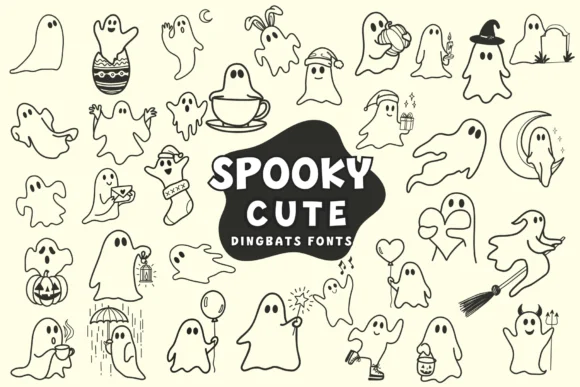
You're laying out Halloween party invites and need characters that feel fun instead of frightening. Spooky Cute by Pui Art is exactly what you're looking for in a font. It's a collection of cartoon ghost dingbats, each drawn with gentle curves and expressive, friendly faces. The whole set stays playful and charming rather than dark or unsettling.
Grab these characters for Halloween invitations, trick-or-treat bag labels, kids' costume tags, seasonal greeting cards, or DIY nursery wall art. The selection is wide enough that layouts don't feel repetitive. Ghosts wear witch hats and Santa hats. Some hold teacups, balloons, or lanterns. A few sport bunny ears or tiny devil horns. Others come with patterned sweaters or carry tiny accessories. You'll find them waving, dancing, flying, and even holding little envelopes. With this much range in poses and costumes, you can compose a whole scene using only the dingbats.
Since these are dingbats, each character maps directly to your keyboard. Drop the font into your design software and start typing or freely placing ghosts straight onto your layouts or canvas. The approach works equally well for print designs, digital projects, or anything in between. Head to Creative Fabrica to grab Spooky Cute.
Style & Use Cases
- Overall Style
- Iconographic, Spooky Cute
- Use Case
- Icons, Accents
- Ideal For
- ornaments, bullets, and decorative flourishes
- Pairs With
- any text font
How to Install Spooky Cute Font
Step-by-step instructions for every platform
- 1Download the Spooky Cute font file (.ttf or .otf).
- 2Locate the downloaded file in your Downloads folder.
- 3Right-click the font file.
- 4Select "Install" to install for the current user, or "Install for all users" to make it available system-wide.
- 5Spooky Cute is now available in Word, Photoshop, Illustrator, and all other apps.


Browse fonts by theme
Curated collections →Saw a font in a picture? Identify any font from an image with our free Font Finder.
More Dingbats Fonts
Browse all →







What pairs well with Spooky Cute Font?
Spooky Cute Font is a versatile dingbats font that works for both headings and body text. Pair it with a contrasting sans-serif or serif font to add visual interest and a clear distinction between titles and body copy.




Spooky Cute Font
by Pui Art
Reviewed by the FontBoxDL team · Updated June 2026