 Firefox
 1 / 5
1 / 5About Spirit Fingers Font
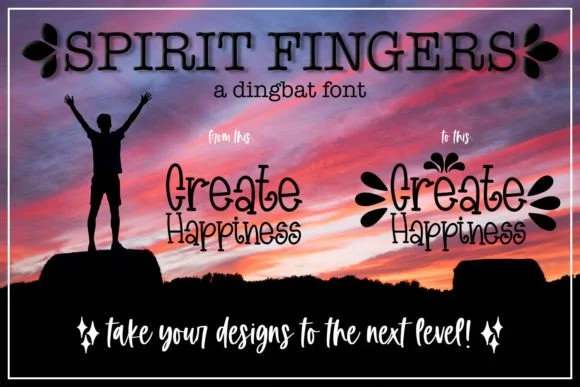
Spirit Fingers captures genuine playful energy through its distinctly hand-drawn aesthetic. Created by Endless Time Graphics, this whimsical dingbat font is a carefully crafted collection of symbols and illustrated marks designed to add real personality and rich visual texture without relying on words alone.
The font shines beautifully for gift tag designs, children's book spot illustrations, and scrapbooking embellishments. It works equally well adding decorative flair to handmade sticker sheets, vintage-style craft project labels, or framed wall art for a nursery or creative workspace. Its hand-drawn quality makes it feel intentional and authentic rather than generic, the kind of work you notice because every line was drawn with real care and intention. Each symbol carries its own personality and character-driven detail that makes viewers pause and actually look closely at what you've created.
Pair this with a clean sans-serif (like a friendly Helvetica or similar typeface) to ground the whimsical energy and keep any accompanying body text readable and fully accessible. This simple combination lets the dingbats shine as decorative accents without competing for visual attention. You'll find Spirit Fingers on Creative Fabrica, ready to download and use as an accent across all kinds of design work and creative projects.
Style & Use Cases
- Overall Style
- Iconographic, Spirit Fingers Dingbat Font
- Use Case
- Icons, Accents
- Ideal For
- ornaments, bullets, and decorative flourishes
- Pairs With
- any text font
How to Install Spirit Fingers Font
Step-by-step instructions for every platform
- 1Download the Spirit Fingers font file (.ttf or .otf).
- 2Locate the downloaded file in your Downloads folder.
- 3Right-click the font file.
- 4Select "Install" to install for the current user, or "Install for all users" to make it available system-wide.
- 5Spirit Fingers is now available in Word, Photoshop, Illustrator, and all other apps.
Browse fonts by theme
Curated collections →Saw a font in a picture? Identify any font from an image with our free Font Finder.
More Dingbats Fonts
Browse all →







What pairs well with Spirit Fingers Font?
Spirit Fingers Font is a versatile dingbats font that works for both headings and body text. Pair it with a contrasting sans-serif or serif font to add visual interest and a clear distinction between titles and body copy.




Spirit Fingers Font
Reviewed by the FontBoxDL team · Updated July 2026