 Firefox
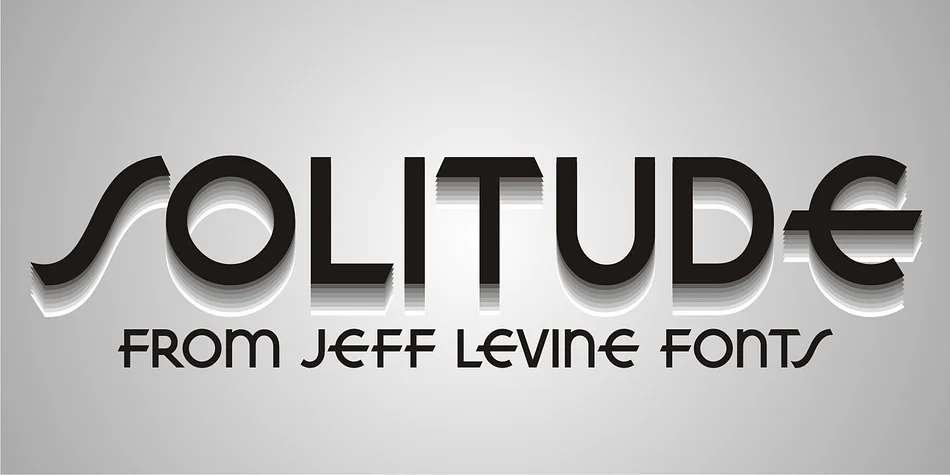
About SOLITUDE JNL Font
Picture a speakeasy entrance with chrome and mirrors, the name in bold letters above the door. That's the spirit of Solitude JNL, created by Jeff Levine Fonts. This typeface draws inspiration from a piece of vintage sheet music with the hand-lettered title "Solitude," capturing the Art Deco aesthetic that dominated graphic design through the 1930s and 1940s. The Streamline style flows through every curve and angle, embodying the movement's obsession with clean, dynamic forms and visual motion.
Solitude JNL excels for retro cocktail lounge menus, 1930s-themed wedding invitation suites, and vintage-inspired cosmetics packaging that needs serious visual personality. Many designers turn to it for art deco event posters and luxury brand logotypes when period authenticity really matters. The font's pronounced curves and sharp geometric angles make it instantly recognizable at large display sizes, giving your headline work genuine presence and impact without feeling forced or overwrought.
What really sets this typeface apart is how naturally it translates that golden-age elegance to modern design projects. The balance between decorative detail and legibility means it reads well when sized large for prominent display work. Grab it from Creative Fabrica and bring that timeless deco sensibility to your next project.
Style & Use Cases
- Overall Style
- Bold, Distinctive
- Use Case
- Headlines, Posters
- Ideal For
- logos, packaging, and standout titles
- Pairs With
- a neutral sans-serif
How to Install SOLITUDE JNL Font
Step-by-step instructions for every platform
- 1Download the SOLITUDE JNL font file (.ttf or .otf).
- 2Locate the downloaded file in your Downloads folder.
- 3Right-click the font file.
- 4Select "Install" to install for the current user, or "Install for all users" to make it available system-wide.
- 5SOLITUDE JNL is now available in Word, Photoshop, Illustrator, and all other apps.
More by Jeff Levine Fonts
View all →



Browse fonts by theme
Curated collections →Saw a font in a picture? Identify any font from an image with our free Font Finder.
More Decorative Fonts
Browse all →







What pairs well with SOLITUDE JNL Font?
SOLITUDE JNL Font is a decorative font that shines as a display or heading face. Pair it with a clean sans-serif or serif font for body text — the contrast creates a clear hierarchy while the two styles stay balanced and easy to read.




SOLITUDE JNL Font
Reviewed by the FontBoxDL team · Updated June 2026