 Firefox
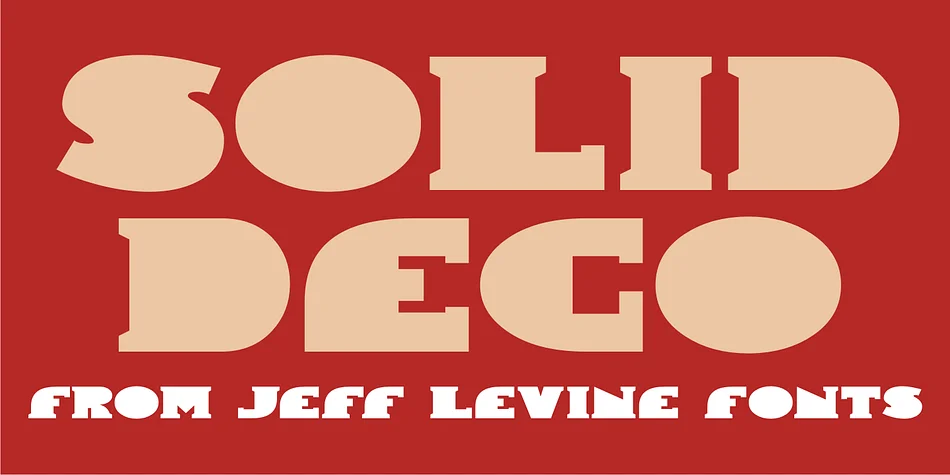
About SOLID DECO JNL Font
This font has the bold, glamorous feel of 1920s nightclub signs and art deco architecture. SOLID DECO JNL, designed by Jeff Levine Fonts, is a solid lettering typeface inspired by authentic vintage signage found in New York's most iconic entertainment districts during the jazz age.
The thick, geometric letterforms work beautifully for speakeasy branding and establishment signage, art deco event posters, upscale restaurant menu headers, and hotel ballroom materials. You'll find it equally effective on vintage-inspired product packaging, cocktail bar window displays, printed materials for themed galas and formal awards ceremonies, retro boutique retail signage, and DIY craft projects that call for authentic 1920s styling. The solid weight of each letter commands attention without needing ornamentation or extra visual effects. What you're looking at is a typeface that feels genuinely authentic to the era, with the kind of geometric precision you'd expect from classic architectural signs and theater marquees. Every character carries the substance and style of genuine period lettering, making it ideal for any project that needs to feel rooted in that golden age of design.
Pair SOLID DECO JNL with a clean, modern sans-serif for body text, letting this decorative font take the spotlight where it matters most. Find it on Creative Fabrica and bring some authentic 1920s polish to your next design project.
Style & Use Cases
- Overall Style
- Bold, Distinctive
- Use Case
- Headlines, Posters
- Ideal For
- logos, packaging, and standout titles
- Pairs With
- a neutral sans-serif
How to Install SOLID DECO JNL Font
Step-by-step instructions for every platform
- 1Download the SOLID DECO JNL font file (.ttf or .otf).
- 2Locate the downloaded file in your Downloads folder.
- 3Right-click the font file.
- 4Select "Install" to install for the current user, or "Install for all users" to make it available system-wide.
- 5SOLID DECO JNL is now available in Word, Photoshop, Illustrator, and all other apps.
More by Jeff Levine Fonts
View all →



Browse fonts by theme
Curated collections →Saw a font in a picture? Identify any font from an image with our free Font Finder.
More Decorative Fonts
Browse all →







What pairs well with SOLID DECO JNL Font?
SOLID DECO JNL Font is a decorative font that shines as a display or heading face. Pair it with a clean sans-serif or serif font for body text — the contrast creates a clear hierarchy while the two styles stay balanced and easy to read.




SOLID DECO JNL Font
Reviewed by the FontBoxDL team · Updated June 2026