 Firefox
 1 / 8
1 / 8About Social Media Font
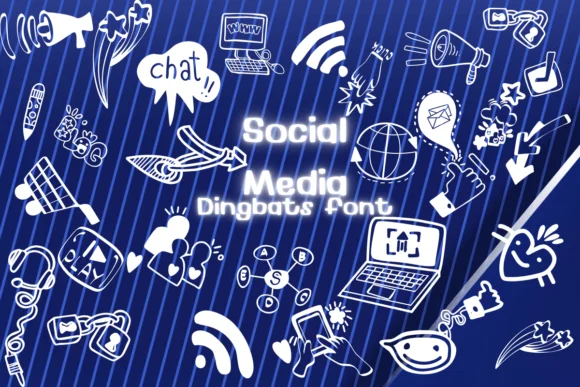
This sketched, hand-drawn style brings instant personality to digital work that needs to feel young and informal. Social Media, designed by Nongyao, is a dingbats font that replaces letters with social icons, communication symbols, and imagery tied to digital connection. Rather than using standard text, you're working with a complete set of visual shortcuts that represent platforms, devices, and the ideas around being online.
The font excels in Instagram story templates where you want authentic, approachable branding, small business identity kits that need flexibility without looking generic, and tech startup pitch presentations that aim for friendly rather than sterile. Podcast cover artwork benefits from its sketched character, as do newsletter headers and email graphics where a little visual warmth matters more than polish. Any project requiring quick symbols for social platforms, messaging, or network concepts finds a home here. The sketched treatment walks a careful line between playful and credible, so it works for both casual creators and small companies seeking visual identity that doesn't read as overly designed.
Pair Social Media with a clean, tight sans-serif for any body copy or fine-print labeling, allowing the dingbats to anchor your visual hierarchy while the sans handles the reading. You'll find it ready to download on Creative Fabrica.
Style & Use Cases
- Overall Style
- Iconographic, App
- Use Case
- Icons, Accents
- Ideal For
- ornaments, bullets, and decorative flourishes
- Pairs With
- any text font
How to Install Social Media Font
Step-by-step instructions for every platform
- 1Download the Social Media font file (.ttf or .otf).
- 2Locate the downloaded file in your Downloads folder.
- 3Right-click the font file.
- 4Select "Install" to install for the current user, or "Install for all users" to make it available system-wide.
- 5Social Media is now available in Word, Photoshop, Illustrator, and all other apps.

Browse fonts by theme
Curated collections →Saw a font in a picture? Identify any font from an image with our free Font Finder.
More Dingbats Fonts
Browse all →






What pairs well with Social Media Font?
Social Media Font is a versatile dingbats font that works for both headings and body text. Pair it with a contrasting sans-serif or serif font to add visual interest and a clear distinction between titles and body copy.




Social Media Font
by Nongyao
Reviewed by the FontBoxDL team · Updated July 2026