 Firefox
 1 / 8
1 / 8About Snowflake Tattoo Font
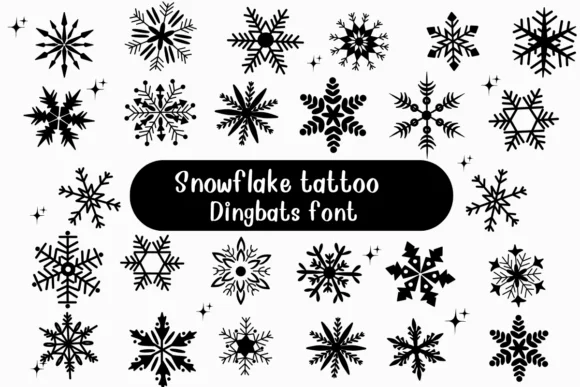
These snowflake symbols strike a balance between geometric structure and decorative character. Snowflake Tattoo, designed by Nongyao, offers an intricately detailed collection of winter symbols rendered with sharp edges and clean symmetry. Each form holds detail at small sizes and scales beautifully when enlarged.
You'll use this across different project contexts. Holiday stationery suites gain real polish from the crisp, structured symbol designs. Winter wedding invitations become more refined when you use these forms for monograms and decorative spacing. Seasonal gift tags hold up well in small applications, and winter home decor prints pick up a modern ornamental quality. The font comes with multiple snowflake variations, so you can layer and combine different symbols to build custom patterns or decorative sequences that feel coordinated across a series.
What stands out is the restraint. There's no visual clutter or unnecessary embellishment, just well-balanced forms that work equally well in minimalist layouts and complex compositions. Designers building holiday campaigns, festive packaging, or seasonal decorative projects will find this gives them a reliable symbol set with real practical value. Get Snowflake Tattoo on Creative Fabrica and add structured winter elegance to your next design.
Style & Use Cases
- Overall Style
- Iconographic, Diy
- Use Case
- Icons, Accents
- Ideal For
- ornaments, bullets, and decorative flourishes
- Pairs With
- any text font
How to Install Snowflake Tattoo Font
Step-by-step instructions for every platform
- 1Download the Snowflake Tattoo font file (.ttf or .otf).
- 2Locate the downloaded file in your Downloads folder.
- 3Right-click the font file.
- 4Select "Install" to install for the current user, or "Install for all users" to make it available system-wide.
- 5Snowflake Tattoo is now available in Word, Photoshop, Illustrator, and all other apps.




Browse fonts by theme
Curated collections →Saw a font in a picture? Identify any font from an image with our free Font Finder.
More Dingbats Fonts
Browse all →







What pairs well with Snowflake Tattoo Font?
Snowflake Tattoo Font is a versatile dingbats font that works for both headings and body text. Pair it with a contrasting sans-serif or serif font to add visual interest and a clear distinction between titles and body copy.




Snowflake Tattoo Font
by Nongyao
Reviewed by the FontBoxDL team · Updated June 2026