 Firefox
 1 / 3
1 / 3Loading font…
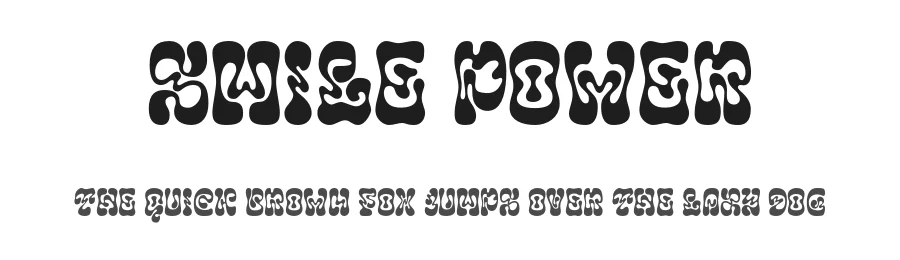
About Smile Power Font
Completed characters only available in commercial version.
Features : Ligatures & Alternates
Please contact me before any commercial use.
My fonts for free use are allowed only in personal projects, and non-profit.
If you make money from using my fonts, Please purchase a commercial license.
Note :
For personal use, you can get special characters by access Character Map for Windows user, and Font Book for MAC user. Watch tutorial below :
How to use Ligatures in Adobe Illustrator & Adobe Photoshop CC
https://youtu.be/36BmzPsKCYE
How to use Alternates in Adobe Illustrator & Adobe Photoshop CC
https://youtu.be/6MgKgJALiFE
How to use Ligatures & Alternates in Canva for Mac
https://youtu.be/3cHS9a3DgHs
How to use Ligatures & Alternates in Canva for Windows
https://youtu.be/lA3LcCM6LD4
You can purchase it in my shop here :
->
https://efstudiotype.com/smile-power-psychedelic-font/
->
https://creativemarket.com/Ef_Studio/13438812-Smile-Power-Psychedelic-Font
->
https://fontbundles.net/ef-studio/2489368-smile-power-psychedelic-font#gtmList=5>mPos=1&aaQ=71a2f7ec86d89f5d27dbaf6331cd9c24&aaI=product_trending
More...
CAUTION!
Anyone who uses personal use fonts for commercial needs without buying a commercial license and without permission from the author, will be subject to fines.
If you need information contact me via email
[email protected]
And if you want to DONATE click here
http://www.paypal.me/luthfief
I really appreciate your donations no matter how much.
Thank you :)
Style & Use Cases
- Overall Style
- Bold, Distinctive, Fancy
- Use Case
- Headlines, Posters
- Ideal For
- logos, packaging, and standout titles
- Pairs With
- a neutral sans-serif
OpenType Features
Smile Power ships with 4 OpenType features you can switch on in apps that support them (Illustrator, InDesign, Affinity, Figma, CSS font-feature-settings).
- Standard ligatures
- Ordinals
- Superscripts
- Stylistic sets (1)
How to Install Smile Power Font
Step-by-step instructions for every platform
- 1Download the Smile Power font file (.ttf or .otf).
- 2Locate the downloaded file in your Downloads folder.
- 3Right-click the font file.
- 4Select "Install" to install for the current user, or "Install for all users" to make it available system-wide.
- 5Smile Power is now available in Word, Photoshop, Illustrator, and all other apps.
More by Ef Studio
View all →


Browse fonts by theme
Curated collections →Saw a font in a picture? Identify any font from an image with our free Font Finder.
More Decorative Fonts
Browse all →







What pairs well with Smile Power Font?
Smile Power Font is a decorative font that shines as a display or heading face. Pair it with a clean sans-serif or serif font for body text — the contrast creates a clear hierarchy while the two styles stay balanced and easy to read.




Premium Decorative Fonts
★ PremiumWant something with more weights, glyphs, and commercial polish? These premium decorative fonts are worth a look.

Smile Power Font
by Ef Studio
Reviewed by the FontBoxDL team · Updated October 2026
License: Free for personal use