 Firefox
About SITTING PRETTY JNL Font
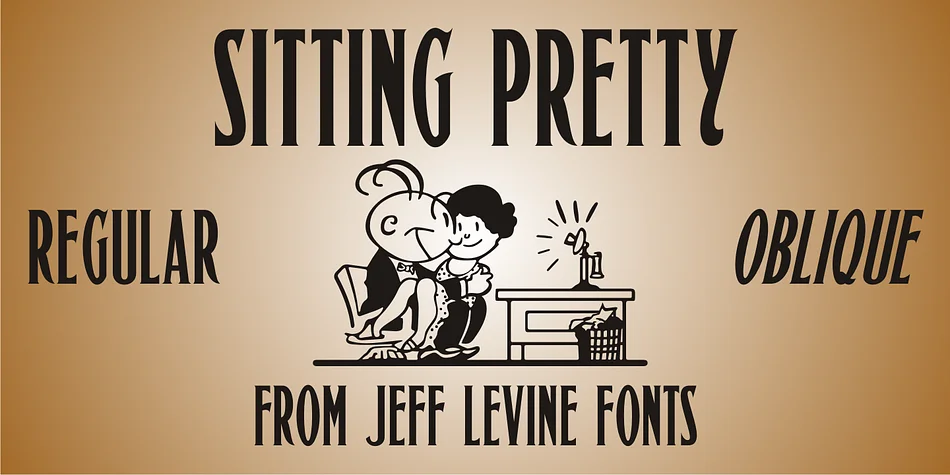
SITTING PRETTY JNL by Jeff Levine Fonts is a condensed Art Nouveau letterform that captures the refined character of authentic 1920s design. Inspired by hand lettering that graced the sheet music for "I'm Sitting Pretty (In A Pretty Little City)" back in 1923, this decorative typeface brings the refined geometry and graceful flowing curves that defined that golden era of American typography. The condensed Roman structure contributes both visual sophistication and practical impact while maintaining excellent legibility, making it versatile enough for projects ranging from digital layouts to large-format print applications.
Reach for this font when you're designing vintage-inspired branding, 1920s wedding invitation suites, retro cosmetics packaging, or speakeasy menu designs that demand authentic period character and style. It works equally well for theatrical poster layouts, luxury boutique signage, antique apothecary labels, and art gallery materials where historical accuracy in typography carries real weight and genuine meaning. The typeface brings enough distinctive personality to anchor a design successfully while remaining legible and practical across different scales and print contexts.
If you're drawn to period-accurate design or need that unmistakable Art Nouveau aesthetic in your work, Sitting Pretty JNL from Creative Fabrica delivers exactly the kind of 1920s sophistication you're looking for.
Style & Use Cases
- Overall Style
- Bold, Distinctive
- Use Case
- Headlines, Posters
- Ideal For
- logos, packaging, and standout titles
- Pairs With
- a neutral sans-serif
How to Install SITTING PRETTY JNL Font
Step-by-step instructions for every platform
- 1Download the SITTING PRETTY JNL font file (.ttf or .otf).
- 2Locate the downloaded file in your Downloads folder.
- 3Right-click the font file.
- 4Select "Install" to install for the current user, or "Install for all users" to make it available system-wide.
- 5SITTING PRETTY JNL is now available in Word, Photoshop, Illustrator, and all other apps.
More by Jeff Levine Fonts
View all →



Browse fonts by theme
Curated collections →Saw a font in a picture? Identify any font from an image with our free Font Finder.
More Decorative Fonts
Browse all →







What pairs well with SITTING PRETTY JNL Font?
SITTING PRETTY JNL Font is a decorative font that shines as a display or heading face. Pair it with a clean sans-serif or serif font for body text — the contrast creates a clear hierarchy while the two styles stay balanced and easy to read.




SITTING PRETTY JNL Font
Reviewed by the FontBoxDL team · Updated June 2026